

Short answer
Only two of the big CRMs ship a real power dialer in the box: Close, from its Growth plan, and HubSpot, on Sales Hub Enterprise only. Salesforce sells click-to-dial and call logging as a $5 add-on, GoHighLevel's Power Dialer is a call queue, and Pipedrive has no built-in calling at all. So most teams end up paying for a CRM seat and a dialer seat for every rep.
Prices come from each vendor's own page, checked October 30, 2026, in US dollars per user per month at list price. More on dialing modes in our sales dialers guide, and on CRMs in the CRM guide.
| CRM | Dialer in the box | Plan it needs | Real power dialing? |
|---|---|---|---|
| Close | Power Dialer, Predictive Dialer | Growth; Scale for predictive | Yes |
| HubSpot | Sales power dialer; calling tool | Enterprise; Starter for calling | Enterprise only |
| Salesforce | Sales Dialer add-on (click-to-dial) | Add-on from $5 a user | No, needs a partner |
| GoHighLevel | Power Dialer (a call queue) | Not published | Queue, no multi-line |
| Pipedrive | None | Marketplace app | No |
| Zoho CRM | Power dialer in Zoho Voice | Zoho Voice Standard or Contact Center | Yes, through Zoho Voice |
| Freshsales | Freshcaller phone | Freshcaller plan | Not on the price page |
What counts as a CRM with a dialer?
A CRM with a dialer is a CRM that can place calls from the contact record and log them back on its own. That covers four very different tools: click-to-call, a call queue labeled "power dialer", a real power dialer that rings the next number by itself, and parallel or predictive dialing that rings several numbers at once.
A CRM with built in dialer features can mean a click-to-call button and a call log. A real power dialer moves through a list without the rep clicking each number. A predictive dialer rings ahead of the reps and connects whoever answers. If you're shopping for a CRM with power dialer or auto dialer features, ask which of the four it is, on which plan.
Close CRM dialer: power and predictive in the box
The Close CRM dialer is the most complete built-in dialer of the big CRMs: a Power Dialer from the Growth plan ($99 a user a month billed annually, $109 monthly) and a Predictive Dialer on Scale ($139 annually, $149 monthly). Calls are billed on top at around $0.02 a minute, and phone numbers start at about $1 a month, per Close's pricing page.
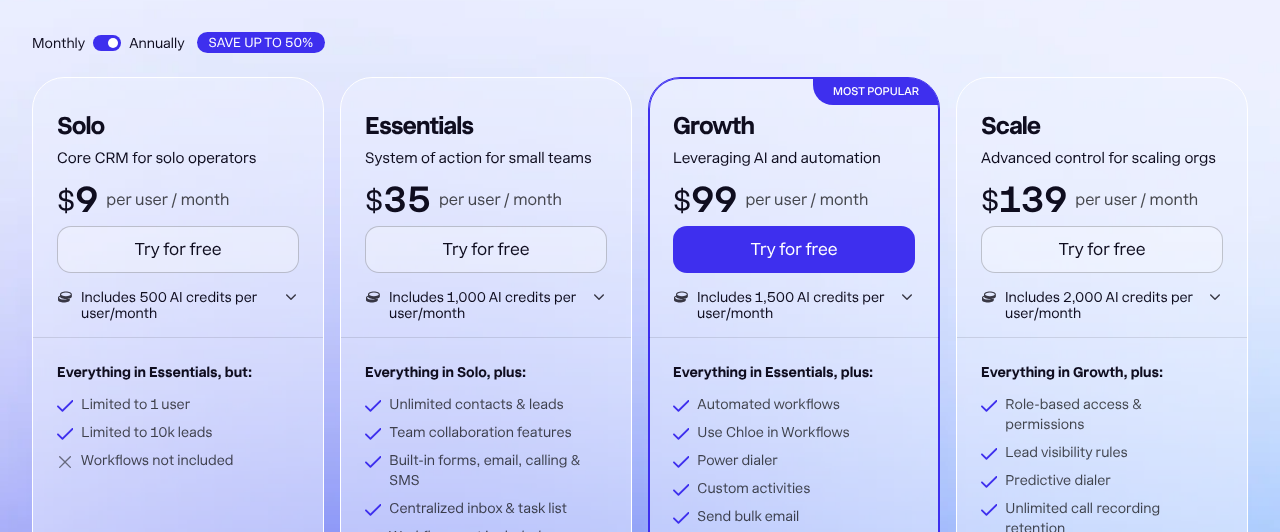
Source: Close pricing page, annual billing, October 30, 2026.
Close's Power Dialer calls one lead at a time from a saved list and skips busy and disconnected numbers. The predictive dialer rings several leads at once and connects a rep only when a person answers. Close's own predictive dialer guide says the best team size is 10 reps and over, and a single rep is unlikely to see call rates rise above 1x.
The plan also decides how long you keep recordings: 30 days on Solo and Essentials, 90 days on Growth, forever on Scale. Live call coaching is Scale only. Warm transfers aren't supported yet (Close calling help), which matters if your setters hand calls to closers.
HubSpot power dialer: Enterprise only
HubSpot's sales power dialer is listed under Sales Hub Enterprise only, at $150 a seat a month billed annually plus a required $3,500 onboarding fee. Starter ($20 list) and Professional ($90 billed annually, $100 monthly) get the calling tool instead, which is click-to-call from a contact record (HubSpot pricing).
The power dialer itself works from the Contacts page: tick contacts, add them to the dialer, set a wrap-up time and start a session. Calls run one contact at a time, with a countdown between them. It needs a HubSpot-provided number.
Native calling minutes are pooled for the whole account, not per rep: 500 a month on Starter, 3,000 on Professional and 12,000 on Enterprise. Ten reps on Professional share 3,000 minutes, which is under 15 minutes a rep a working day. When the pool runs out, the call button turns off until the next month.
Marketplace dialers don't use those minutes, but they're a second bill. HubSpot's full price at 10, 25 and 50 seats breaks down the rest.
Salesforce dialer: click-to-dial for $5 a user
The Salesforce dialer, Sales Dialer, is an add-on that starts at $5 a user a month billed annually and adds click-to-dial and automatic call logging. Salesforce's add-ons page lists it for Pro Suite and up. It doesn't include phone lines or minutes, and Salesforce doesn't describe any power, parallel or predictive mode for it.
Sales Engagement ($50 a user) adds cadences and a work queue, but its pricing page never mentions a dialer. Salesforce's own phone product, Salesforce Voice, costs $50 a user for Partner Contact Center and $125 for Contact Center, and it's built for service teams more than outbound sales.
So a Salesforce team that wants a real power dialer buys one from an AppExchange partner such as Kixie, Dialpad or Orum, on top of the Salesforce seat. A Pro Suite seat ($100) plus Sales Dialer starts at $105 a rep before any calls are made. See Salesforce pricing at 10, 25 and 50 seats for the editions.
GoHighLevel power dialer: a call queue with free seats
The GoHighLevel power dialer is a call queue: workflows add contacts to a Manual Actions list, the rep starts each call, marks it No Answer, Busy, Voicemail or Completed, and moves to the next. HighLevel's own walkthrough describes it this way, and it lists no parallel or predictive mode.
What GoHighLevel gets right is the seat bill. Every plan, at $97, $297 or $497 a month, comes with unlimited users (GoHighLevel pricing), so a 50-rep floor pays the same platform fee as a 5-rep one. Calls run $0.0166 a minute in the US and Canada, billed in full minutes, and a local number is $1.15 a month on HighLevel's phone rates page.
Teams that need more than one line at a time plug in Wavv (up to three lines) or Kixie (up to four). We liked Wavv, but it was a dialer bolted onto GoHighLevel: it ran as a layer above the CRM, and that made the whole system laggy. More in what GoHighLevel really costs a sales team.
Pipedrive dialer and Zoho CRM dialer
Pipedrive has no built-in dialer. Its help center says plainly that "Pipedrive doesn't have a built-in calling integration" and points to Marketplace apps such as CloudTalk, Kixie, Aircall and JustCall. Every Pipedrive dialer is a second subscription. Pipedrive seat prices are on Pipedrive's pricing page.
Zoho CRM calls through Zoho Voice. The power dialer is included on Zoho Voice's Standard and Contact Center plans and is an add-on on the others (Zoho Voice pricing), and no predictive mode is listed. CRM seat prices are on Zoho's CRM pricing page. Zoho CRM's cost by edition has the details.
Freshsales works the same way through Freshcaller. Freshsales Pro is $39 a user billed annually (Freshsales pricing), Freshcaller Pro is another $39 an agent plus minutes (Freshcaller pricing), and Freshcaller's price page doesn't list a power dialer on any plan.
Built-in dialer or a dialer plugged into your CRM?
A built-in dialer gives you one bill and one record, but it's usually basic. A dialer plugged into your CRM dials better, with multi-line and local presence options, but you pay a second seat for every rep and depend on a sync between two systems. Pick built in if the dialer does what your floor needs, and plug in only when it doesn't.
| Built-in dialer | Plugged-in dialer | |
|---|---|---|
| Dialing | Click-to-call, queue or one-line power | Power, parallel, some predictive |
| Cost per rep | One seat | CRM seat plus dialer seat |
| Call logs | Written straight to the record | Synced, sometimes late |
| Outcomes | The CRM's own fields | Must be mapped by hand |
| When it breaks | The vendor fixes it | Two vendors point at each other |
The sync is where plugged-in dialers go wrong. JustCall's HubSpot contact sync takes 30 minutes to an hour, needs the Team plan or higher, doesn't update email addresses, and lets the most recent duplicate overwrite the older contact. On HubSpot Professional, Orum's HubSpot listing says it can't call straight from sequences. One client's sales floor joined its dialer and CRM with a Zap, and it broke whenever a vendor shipped an update.
| Dialer | Seat price a month | CRMs it lists natively |
|---|---|---|
| JustCall | $29 to $89 billed annually, 2-seat minimum | HubSpot, Salesforce (Pro plan up), Pipedrive, Zoho, Close, HighLevel |
| Aloware | From $30, 5 to 10-user minimum | HubSpot, Salesforce, Pipedrive, Zoho, HighLevel |
| PhoneBurner | $140 to $183 billed annually | Salesforce, HubSpot, Zoho, Close, GoHighLevel |
| Kixie | Not published | HubSpot, Salesforce, Pipedrive, Zoho, HighLevel |
| Orum | Quote only, 9-seat minimum | Salesforce, HubSpot |
| Cleanform, owned, no seat fees | $0 | Built into one system |
Cleanform is $0 a seat at any team size: you pay monthly for the build until it's paid off, then mostly hosting. How pricing works.
CRM for cold calling: how to choose
The right CRM for cold calling is the one whose dialer matches how many calls your reps make an hour. A rep who calls between meetings can live with click-to-call. A floor that dials all day needs a real power or parallel dialer, built in or plugged in. Before you sign, check these six things:
- What the dialer really does. Click-to-call, queue, power, parallel or predictive, on the plan you'd buy.
- Plan gating. HubSpot's power dialer is Enterprise only, and Close's predictive dialer is Scale only.
- Usage fees. Minutes, numbers, recording and transcripts are billed on top almost everywhere.
- Seat minimums. Orum starts at 9 seats, Aloware at 5 or 10, JustCall at 2.
- Spam-number tools. A floor that dials all day gets numbers flagged. Here's why business numbers show Spam Likely and how to fix it.
- Data export. What you can take with you if you leave, from contacts to call recordings.
Calling rules apply whichever tool you buy. Consent, calling hours and abandoned-call limits are in our TCPA rules for sales calls. That page isn't legal advice, and neither is this one.
What a CRM with a dialer costs at 10, 25 and 50 reps
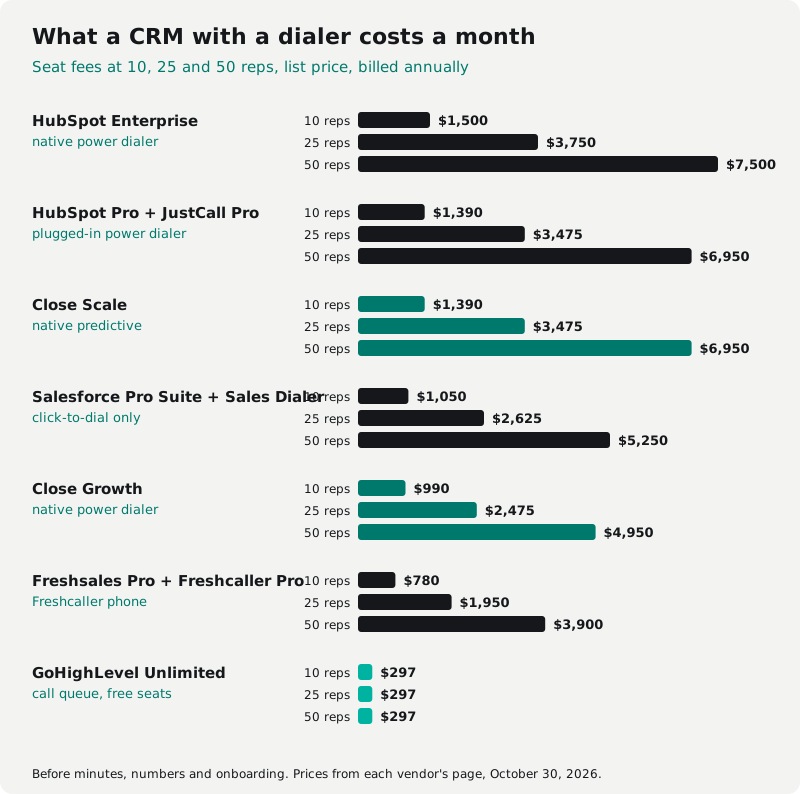
A CRM with a dialer costs about $780 to $1,500 a month for 10 reps on a per-seat setup, and $3,900 to $7,500 for 50, on seat fees alone. GoHighLevel is the exception at $297 a month flat, because its seats are free. These are our sums from list prices, billed annually, before minutes, numbers and onboarding.
| Setup | Dialer you get | 10 reps | 25 reps | 50 reps |
|---|---|---|---|---|
| HubSpot Enterprise | Native power dialer | $1,500 | $3,750 | $7,500 |
| HubSpot Pro + JustCall Pro | Plugged-in power dialer | $1,390 | $3,475 | $6,950 |
| Close Scale | Native predictive | $1,390 | $3,475 | $6,950 |
| Salesforce Pro Suite + Sales Dialer | Click-to-dial only | $1,050 | $2,625 | $5,250 |
| Close Growth | Native power dialer | $990 | $2,475 | $4,950 |
| Freshsales Pro + Freshcaller Pro | Freshcaller phone | $780 | $1,950 | $3,900 |
| GoHighLevel Unlimited | Call queue | $297 | $297 | $297 |
| Cleanform, owned, no seat fees | Built for your floor | $0 | $0 | $0 |
HubSpot adds a one-time onboarding fee of $3,500 on Enterprise and $1,500 on Professional. Close is $10 a user more billed monthly. GoHighLevel's calls and numbers come on top, and a multi-line dialer for it is a second seat.
Best CRM with dialer for each kind of team
The best CRM with a dialer for a phone-first team is Close: one bill, a real power dialer at $99 a user and predictive on Scale. HubSpot and Salesforce are better CRMs than dialers, so their teams should plug in a dialer that syncs well and budget for two seats. GoHighLevel wins on cost at any team size, as long as a call queue is enough.
- Calling is the main channel, 5 to 50 reps: Close Growth, or Scale once you have 10 or more reps on one list.
- Already on HubSpot Professional: plug in a dialer from the Marketplace rather than paying Enterprise prices for its power dialer.
- Already on Salesforce: an AppExchange dialer. Sales Dialer alone won't run a floor.
- Agency or a big, mixed team on a budget: GoHighLevel, with Wavv or Kixie if reps need multi-line dialing.
- Spending $2,000 a month or more on CRM, dialer and texting seats: price owning one system.
More options in GoHighLevel alternatives at 10 to 50 seats.
Own your CRM with dialer instead
Owning your CRM with dialer as one system makes sense once your CRM, dialer and texting seats cost about $2,000 to $3,000 a month or more. That's 15 to 20 reps on HubSpot Pro with JustCall. Under $1,000 a month, keep what you have, because the switch won't pay for itself.
Past that line, an owned system puts the dialer, the script, dispositions and the pipeline on one screen, with no sync to break and no second seat for each hire. One sales floor we built for was paying about $4,500 a month for eight closers across a per-seat dialer, a per-seat CRM, a scheduling tool and a Zap. Those four tools became one system the business owns, which now costs about $300 a month in hosting, and an added seat costs $0 (the dialer and CRM case study).
However much you pay a CRM or dialer vendor, the system never becomes yours. Stop paying and the account, workflows and setup stop with it. You keep your contacts and some records, depending on each vendor's export terms.
How it's paid for: typically less than you spend today, paid monthly, and the build payments have an end date. You get the code, the data and the IP. Here's how pricing works.
Sources
Prices and plan details checked October 30, 2026, on each vendor's own page. Prices change, so check before you buy.
- Close pricing, Close calling help and Close predictive dialer guide
- HubSpot Sales Hub pricing and HubSpot sales power dialer
- Salesforce Sales Cloud add-ons and Salesforce Voice pricing
- GoHighLevel pricing, HighLevel power dialer and HighLevel phone rates
- Pipedrive calling help, Zoho Voice pricing, Freshsales pricing and Freshcaller pricing
- JustCall pricing and JustCall HubSpot sync, Aloware pricing, PhoneBurner pricing, Kixie integrations, Orum pricing and Orum on the HubSpot Marketplace
The SaaS cost calculator adds up your whole stack in about two minutes. If it comes out at a few thousand a month, book a free audit and we'll show you what one owned system would replace.
Frequently asked questions
Does HubSpot have a power dialer?
Yes, but only on Sales Hub Enterprise, at $150 a seat a month billed annually plus a required $3,500 onboarding fee. HubSpot's Starter and Professional plans have the calling tool, which is click-to-call from a contact record. Most HubSpot teams that want power dialing plug in a dialer from the HubSpot App Marketplace instead.
Does Salesforce have a dialer?
Salesforce sells Sales Dialer as an add-on starting at $5 a user a month, billed annually. It adds click-to-dial and automatic call logging, not power or predictive dialing, and it doesn't include phone lines or minutes. Teams that want real power dialing in Salesforce buy a partner dialer from AppExchange.
Does GoHighLevel have a power dialer?
Yes. GoHighLevel's Power Dialer is a call queue: workflows add contacts to a Manual Actions list, the rep starts each call, logs No Answer, Busy, Voicemail or Completed, and moves to the next. HighLevel lists no parallel or predictive mode. Seats are free on every plan, and calls cost $0.0166 a minute in the US and Canada.
What is the best CRM with a dialer?
Close is the best CRM with a dialer for a team that sells mostly by phone and wants one bill: its power dialer starts on Growth at $99 a user a month billed annually, and predictive dialing is on Scale at $139. HubSpot and Salesforce teams usually do better with a plugged-in dialer, and a team spending $2,000 or more a month on both should price owning one system.
Can a CRM have a predictive dialer?
Yes. Close includes a predictive dialer on its Scale plan, at $139 a user a month billed annually, and says it works best with 10 or more reps. HubSpot, Salesforce and GoHighLevel don't ship a predictive dialer, so their teams add one from a dialer vendor.
Is there a free CRM with a dialer?
Not among the big names. HubSpot's free CRM costs $0 for up to 2 users but has no calling. HubSpot's calling tool starts on Sales Hub Starter, and its power dialer is on Enterprise only.