

Short answer
Salesforce CRM costs $25, $100, $195, $395 or $550 per user a month, depending on the edition: Starter Suite, Pro Suite, Core, Advanced or Max. Everything above Starter is billed annually, so a 25-rep team on Core pays $4,875 a month, $58,500 a year, before add-ons, calling or admin.
That's the whole of Salesforce pricing for a sales team, and the seat price is the smallest honest number in it. The prices below are US list prices from Salesforce's Sales Cloud pricing page, checked October 26, 2026, before tax. This page covers Sales Cloud, not Marketing Cloud, Service Cloud or nonprofit pricing.
| Edition | Per user a month | Billing | First thing it adds | 10 reps a month |
|---|---|---|---|---|
| Free Suite | $0 | No contract | Contacts and deals, 2 users | $0 (2 users max) |
| Starter Suite | $25 | Monthly or annual | Activity capture, mobile app | $250 |
| Pro Suite | $100 | Annual, contract | Quotes, 5 flows, forecasting | $1,000 |
| Core | $195 | Annual | Approvals, territories, full API | $1,950 |
| Advanced | $395 | Annual | Security, full sandbox, lead scoring | $3,950 |
| Max | $550 | Annual | Agentforce for Sales included | $5,500 |
| Cleanform, owned, no seat fees | $0 | Monthly | Built around how you sell | $0 |
Cleanform is $0 a seat at any team size: you pay monthly for the build until it's paid off, then mostly hosting. How pricing works.
Salesforce pricing plans and editions
Salesforce editions for Sales Cloud are Free Suite ($0), Starter Suite ($25), Pro Suite ($100), Core ($195), Advanced ($395) and Max ($550) per user a month. Salesforce renamed its upper tiers in September 2026: Core replaced Enterprise, Advanced replaced Unlimited and Max replaced Agentforce 1 (Salesforce news).
The features a sales team feels, by paid edition above Starter, from Salesforce's comparison table:
| Feature | Pro Suite | Core | Advanced | Max |
|---|---|---|---|---|
| Quotes, contracts and orders | Yes | Yes | Yes | Yes |
| Flow Builder automation | 5 flows | Yes | Yes | Yes |
| Sales console apps | 1 app | Yes | Yes | Yes |
| Web Services API | +$25 a user | Yes | Yes | Yes |
| Approval processes | No | Yes | Yes | Yes |
| Advanced forecasting | No | Yes | Yes | Yes |
| Sales territories and teams | No | Yes | Yes | Yes |
| Sandbox included | Developer | Partial | Full | Full |
| Premier support | Add-on | Yes | Yes | Yes |
| Slack | Free | Business+ | Business+ | Enterprise+ |
| Flex Credits a year | None | 500K | 1M | 2.75M |
| Agentforce for Sales | No | Add-on | Add-on | Yes |
Starter Suite has none of the rows above. It gets activity capture and the mobile app, which Free Suite lacks.
Salesforce Starter Suite pricing
Salesforce Starter Suite costs $25 a user a month, billed monthly or annually at the same price. It covers leads, accounts, contacts and opportunities, email and calendar sync, lead routing, simple email campaigns and the mobile app. It has no Flow Builder, no quotes and no forecasting, so it's a contact manager with a pipeline, sized for a team without much process yet.
Salesforce Pro Suite pricing
Salesforce Pro Suite costs $100 a user a month, billed annually, and the CRM pricing page adds "Contract required." It adds quotes and contracts, forecasting, offline mobile, a developer sandbox and app building. The limits are tight for a real sales floor: 5 flows for the whole company, 1 console app, and API access at an extra $25 a user a month. Premier support is an add-on with no published price.
Salesforce enterprise edition pricing: Core, Advanced and Max
Core costs $195 a user a month and is Salesforce's replacement for Enterprise Edition. It's the first edition with approval processes, territories, sales teams, opportunity splits, advanced forecasting and the full API, and Premier support is included. Core also includes a partial sandbox and 500,000 Flex Credits a year for AI.
Advanced costs $395 a user a month (the old Unlimited tier). It adds Salesforce's security tools, a full sandbox, lead scoring, predictive forecasting and 1 million Flex Credits. Max costs $550 and includes Agentforce for Sales, Spiff, Maps, Sales Planning and 2.75 million Flex Credits.
Salesforce doesn't publish what the old Enterprise and Unlimited prices became under the new names, so don't assume your renewal maps one to one.
Is Salesforce free?
Salesforce is free only for two users. The Free Suite gives 2 user licences with no expiry date as long as someone logs in at least once every 60 days, and it needs no contract or credit card. It has no mobile app, automation or quotes, and three or more users means Starter Suite or higher.
Salesforce free trial
Starter Suite, Pro Suite, Core and Advanced each have a 30-day free trial with no credit card, and the Starter Suite trial covers up to 10 users. Max has no trial button: you talk to sales. Trial the edition you'd actually buy: approvals, territories and forecasting don't exist on Starter or Pro Suite, so a Starter trial tells you nothing about Core.
Salesforce pricing per user for 10, 25 and 50 reps
Salesforce costs a 10-rep team $250 to $5,500 a month depending on the edition, a 25-rep team $625 to $13,750, and a 50-rep team $1,250 to $27,500. Each figure is seats multiplied by Salesforce's list price. Salesforce publishes no volume discount, so the cost per user stays flat as you grow.
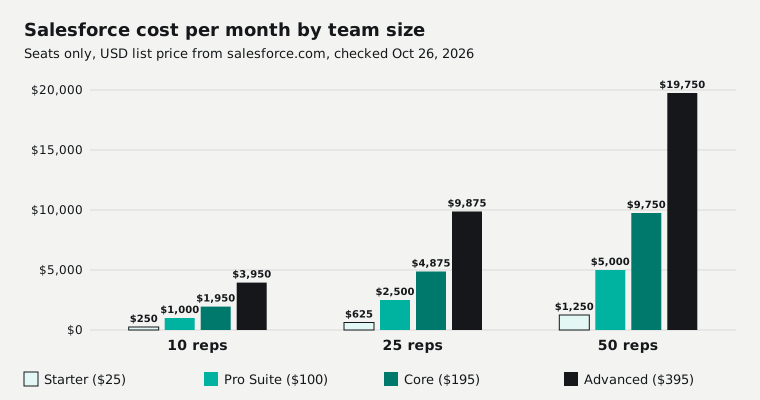
| Edition | 10 reps | 25 reps | 50 reps |
|---|---|---|---|
| Starter Suite ($25) | $250 | $625 | $1,250 |
| Pro Suite ($100) | $1,000 | $2,500 | $5,000 |
| Core ($195) | $1,950 | $4,875 | $9,750 |
| Advanced ($395) | $3,950 | $9,875 | $19,750 |
| Max ($550) | $5,500 | $13,750 | $27,500 |
| Cleanform, owned, no seat fees | $0 | $0 | $0 |
Over three years, with headcount and list prices flat, Pro Suite costs $36,000, $90,000 and $180,000 at 10, 25 and 50 reps. Core costs $70,200, $175,500 and $351,000.
Headcount is never flat on a sales team. In our experience, you hire 10 reps and 3 or 4 stick, and on an annual Salesforce contract you keep paying for the seats of the ones who left.
Salesforce pricing calculator: three real bills
A Salesforce pricing calculator comes down to seats times the edition price, plus per-user add-ons. These three bills use only published prices, in USD, at list, on annual billing, before tax, with no negotiated discount, no calling or texting and no implementation.
| Team | What's in it | Per month | Per year | 3 years |
|---|---|---|---|---|
| 10 reps, Pro Suite | 10 seats x $100 | $1,000 | $12,000 | $36,000 |
| 25 reps, Core | 25 seats x $195, Premier included | $4,875 | $58,500 | $175,500 |
| 50 reps, Core + Sales Engagement | 50 x $195, plus 50 x $50 | $12,250 | $147,000 | $441,000 |
Add Pro Suite's API access for an integration and the first bill is $1,250 a month.
Salesforce add ons and what they cost
Salesforce add-ons are mostly priced per user per month on top of the edition, billed annually: Sales Engagement $50, Conversation Insights $50, Maps from $75, Agentforce for Sales $125, Revenue Cloud Growth (CPQ) $150 and Revenue Intelligence from $220. Prices are from Salesforce's Sales Cloud add-ons page.
| Add-on | Per user a month | 10 reps | 25 reps | 50 reps |
|---|---|---|---|---|
| Sales Dialer (click-to-dial) | From $5 | $50 | $125 | $250 |
| Sales Engagement (cadences) | $50 | $500 | $1,250 | $2,500 |
| Conversation Insights | $50 | $500 | $1,250 | $2,500 |
| Salesforce Maps | From $75 | $750 | $1,875 | $3,750 |
| Agentforce for Sales | $125 | $1,250 | $3,125 | $6,250 |
| Revenue Cloud Growth (CPQ) | $150 | $1,500 | $3,750 | $7,500 |
Revenue Intelligence is $220 on its own page and $250 on the add-ons page, where it seems to include Tableau. Budget from $220.
The platform extras are priced differently. Extra API calls are $25 a month per 10,000 daily calls, and sandboxes beyond what your edition includes cost 5% (Developer Pro), 20% (Partial) or 30% (Full) of your net spend (platform add-ons, sandbox pricing). Extra storage is "Request a Quote".
Salesforce CPQ pricing
Salesforce CPQ is now sold as Revenue Cloud: Growth costs $150 a user a month for quoting, a product configurator and subscriptions, and Advanced costs $200 with contracts, invoicing and analytics. Both need an annual contract (Revenue Cloud pricing).
Salesforce dialer and texting
Salesforce's Sales Dialer starts at $5 a user a month and only adds click-to-dial and automatic call logging. It doesn't include phone lines or minutes. Native calling sits on the Service Cloud side, at $125 a user a month for Contact Center or $50 to bring your own telephony (Salesforce voice pricing), and Salesforce publishes no Sales Cloud price for texting. Here's how Salesforce's dialer compares with HubSpot's and Close's.
Most sales teams add a phone system instead. Aircall is $30 or $50 a licence a month on annual billing, with a 3-licence minimum (Aircall pricing), and Dialpad's business phone is $15 or $25 (Dialpad pricing). That's a second per-seat bill. Our guide to sales dialers covers the options, and Kixie vs Aircall prices two of them side by side.
Salesforce Agentforce pricing
Salesforce Agentforce pricing comes in three forms: $125 per user a month for unmetered use by your staff, $500 per 100,000 Flex Credits for pay-per-action use, or $2 per conversation for customer-facing agents (Agentforce pricing). A standard action uses 20 credits, so at list price each one costs about $0.10.
Core, Advanced and Max include 500,000, 1 million and 2.75 million Flex Credits per org a year. At 20 credits an action, Core's allowance covers about 25,000 actions a year for the whole company, worth $2,500 at list. Agentforce for Sales is included only on Max. On Core and Advanced it's an add-on.
Salesforce implementation cost and hidden costs
Salesforce publishes no implementation price. Professional Services and the top Signature support plan show no price, only a way to contact sales (Salesforce services pricing), so setup is quoted by Salesforce or by a partner. Partners publish starting prices: Cyntexa's quickstart for Sales and Service Cloud starts at $3,500, with setup, data migration and training (Cyntexa).
Ongoing help is the bigger line. Vantage Point, a Salesforce consultancy, sells 10 hours a month for $2,000 and 30 hours for $5,400, with a 6-month minimum, and charges $225 an hour over that (Vantage Point price list, updated October 10, 2026).
An in-house admin costs more. The Bureau of Labor Statistics has no Salesforce admin category, but the median pay for computer systems analysts was $105,850 in May 2025. A quarter of that person is $2,205 a month in wages.
Here's what a Core team pays with a phone system and a quarter-time admin. The admin line is our assumption, not a Salesforce price, and implementation isn't in it.
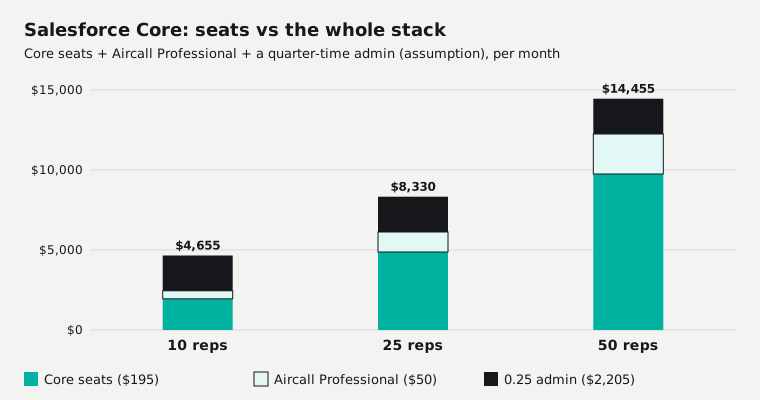
| Stack, per month | 10 reps | 25 reps | 50 reps |
|---|---|---|---|
| Starter + Aircall Essentials + 0.25 admin | $2,755 | $3,580 | $4,955 |
| Core + Aircall Professional + 0.25 admin | $4,655 | $8,330 | $14,455 |
For a small team, the admin line is what pushes the bill past $2,000 a month, not the seat price.
Salesforce hidden costs in the contract
Salesforce's contract makes seats hard to shed. Under its Main Services Agreement (dated October 15, 2026), payments can't be cancelled, fees paid aren't refunded, and seat quantities "cannot be decreased during the relevant subscription term." Taxes are extra.
Subscriptions renew for another year unless you give written notice at least 30 days before the term ends. Renew with fewer seats or a shorter term and Salesforce can re-price you without regard to your old per-unit price. The agreement sets no cap on renewal increases.
List prices have gone up twice recently: an average of 9% in August 2023, when Enterprise went from $150 to $165 a user (2023 announcement), and an average of 6% on Enterprise and Unlimited from August 1, 2025, with Starter and Pro unchanged (2025 announcement). We found no announced increase for 2026.
Leaving takes planning. After your contract ends, you have 30 days to ask for your data, and then Salesforce deletes it. The built-in Data Export Service runs weekly on Enterprise and Unlimited and every 29 days on Professional (Salesforce's training site still uses the old edition names), and each download link expires 48 hours after the email (Trailhead). Your records leave with you. Your flows, reports and setup don't. More on that in CRM data ownership and export.
This isn't legal advice. Your own order form can change these terms, so read it.
Salesforce small business pricing
For a small business of 5 to 10 people, Salesforce costs $125 to $250 a month on Starter Suite or $500 to $1,000 on Pro Suite. Salesforce says Pro Suite setup is "completely turnkey" (Pro Suite page), but publishes no setup timeline and doesn't say whether you'll need an admin.
Once you need quotes or more than a handful of automations, you're on Pro Suite, and its 5-flow limit is the one small teams hit first. Check it against HubSpot and Zoho before signing a 12-month contract.
Salesforce vs HubSpot cost
Salesforce Pro Suite costs more than HubSpot per seat: $100 a user a month on an annual contract, against $90 for HubSpot Sales Hub Professional billed annually ($100 monthly), which also requires a one-time $1,500 onboarding fee (HubSpot pricing). At 25 reps that's $2,500 a month for Salesforce and $2,250 for HubSpot.
| CRM plan (annual billing) | Per seat | 10 reps | 25 reps | 50 reps |
|---|---|---|---|---|
| Salesforce Pro Suite | $100 | $1,000 | $2,500 | $5,000 |
| Salesforce Core | $195 | $1,950 | $4,875 | $9,750 |
| HubSpot Sales Hub Professional | $90 | $900 | $2,250 | $4,500 |
| Zoho CRM Professional | $23 | $230 | $575 | $1,150 |
| Cleanform, owned, no seat fees | $0 | $0 | $0 | $0 |
HubSpot and Zoho prices were checked October 26, 2026. HubSpot's onboarding fee is on top. Zoho is the cheap end: every edition is laid out in our Zoho CRM pricing breakdown.
The typical cost of a CRM seat for a sales team runs about $9 to $139 a month on annual billing across the per-seat vendors: Close $9 to $139, Freshsales $9 to $59 and monday CRM $12 to $28 (checked October 25). Salesforce Core at $195 sits above all of them. For a flat-priced CRM next to HubSpot, see GoHighLevel vs HubSpot, and every plan from every vendor is in our CRM pricing comparison.
Which Salesforce edition should you pick?
Most sales teams of 15 to 50 reps with managers who forecast should pick Core at $195 a user, because approvals, territories, advanced forecasting and the full API start there and Premier support is included. Smaller teams with a simple process are better off on Pro Suite at $100. Salesforce gives no rep-count rule. This is our read:
| Your team | Edition |
|---|---|
| 1 to 2 people, testing a CRM | Free Suite |
| Up to 10 reps, no real process yet | Starter Suite, $25 |
| 10 to 25 reps who need quotes and a few automations | Pro Suite, $100 |
| 15+ reps, managers forecast, approvals and territories | Core, $195 |
| Strict security needs, a full test sandbox, predictive forecasting | Advanced, $395 |
| Want AI agents included instead of bought per user | Max, $550 |
Buy for the team you'll have in 12 months, not the team you have today. You can add seats mid-term but you can't remove them.
Salesforce alternatives: keep renting or own it
The cheaper Salesforce alternatives on seat price are HubSpot, Zoho, Close and monday CRM, which all undercut Core per seat. But switching CRMs rarely fixes the bill on its own. Seats alone reach $2,000 a month at 20 Pro Suite users, 11 on Core, 6 on Advanced or 4 on Max. Add a phone system and an admin, and a 10-rep Core team is at $4,655.
If your CRM and the tools around it cost under $1,000 a month and fit how you sell, keep them. For a flat plan with unlimited users instead, see GoHighLevel's pricing.
Owning starts to pay when the stack is the bill. One client's sales floor ran a per-seat dialer, a per-seat CRM, a scheduling tool and a Zap: about $4,500 a month for eight closers, and every new rep was a $560-a-month decision. We replaced all four with one system the business owns, with the dialer, script, dispositions and pipeline on one screen. Hosting runs about $300 a month, and an added seat costs $0 (the dialer and CRM case study).
However much you pay Salesforce, or a consultant to build it out, the system never becomes yours. To compare honestly, multiply your monthly software bill by 36 and set that against a quote. With Cleanform you keep the code, the data and the IP. It's typically less than you spend today, paid monthly, and the build payments have an end date (how pricing works). The build-or-buy call is laid out in custom CRM development, and the wider field in our CRM software guide.
Sources
Salesforce's Sales Cloud, Agentforce and Free Suite pages were checked October 26, 2026; everything else October 25, 2026, unless dated above. Prices change, so check the vendor's page before you buy.
- Salesforce Sales Cloud pricing and Free Suite
- Salesforce Sales Cloud add-ons, platform add-ons and sandbox pricing
- Agentforce pricing, Revenue Cloud pricing and voice pricing
- Salesforce services pricing and Pro Suite for small business
- Salesforce Main Services Agreement (October 15, 2026) and Data Export Service on Trailhead
- Salesforce news: 2026 editions, 2025 price update and 2023 price update
- HubSpot Sales Hub pricing, Zoho CRM pricing, Close, Freshsales and monday CRM
- Aircall pricing and Dialpad pricing
- Partners: Cyntexa quickstarts and Vantage Point support packages; BLS, computer systems analysts
The SaaS cost calculator adds up your whole stack in about two minutes. If it comes out at a few thousand a month, book a free audit and we'll show you what one owned system would replace.
Frequently asked questions
How much does Salesforce cost per month?
Salesforce Sales Cloud costs $25 (Starter Suite), $100 (Pro Suite), $195 (Core), $395 (Advanced) or $550 (Max) per user a month. A 10-rep team pays $250 a month on Starter, $1,000 on Pro Suite and $1,950 on Core, before add-ons, calling and admin.
Is Salesforce free?
Only for two people. Salesforce's Free Suite is free for up to 2 users with no expiry, as long as someone logs in every 60 days, and needs no card or contract. Three or more users means a paid edition. Starter through Advanced have a 30-day free trial with no card.
How much is Salesforce per user?
Salesforce charges per user, per month: $25 on Starter Suite, $100 on Pro Suite, $195 on Core, $395 on Advanced and $550 on Max. Salesforce publishes no volume discount, so 50 users cost 50 times the seat price at list.
What are the hidden costs of Salesforce?
The costs that aren't in the seat price are add-ons priced per user (Sales Engagement $50, Agentforce for Sales $125, CPQ $150), API access on Pro Suite ($25 a user), sandboxes at 5% to 30% of net spend, calling and texting, implementation (quote only) and someone to run it.
Can I pay Salesforce monthly?
Only on Starter Suite, which is billed monthly or annually at the same $25. Pro Suite, Core, Advanced and Max are billed annually, and Pro Suite says a contract is required. Salesforce publishes no monthly-billing price for them.
Do I need a Salesforce admin?
Salesforce's own pages call Starter and Pro Suite setup turnkey and say it takes minutes, but they don't say whether you need an admin. From Core up you get flows, approvals and territories that someone has to own, so most teams of 10 or more budget for part-time admin help.