

Short answer
CRM data is everything your CRM stores about the people you sell to: contacts, companies, deals, calls, emails, notes, and the history that ties them together. In most contracts you own it.
Getting it out is the hard part. Exports come out one object at a time, some of your data stays behind, and the clock starts the day you cancel. We've moved sales floors off rented CRMs, and the export is where the surprises are. Terms below were checked on October 14, 2026 and again on October 20; they change, and this isn't legal advice.
What is CRM data?
CRM data is the customer information a sales team keeps in its CRM, plus a record of every touch with each customer. Some of it the reps type in. Most of it should come in on its own, from the dialer, the inbox and the calendar.
CRM data examples
| Kind of data | Examples | When you leave |
|---|---|---|
| Contacts and companies | Name, phone, email, title, company, lead source | The easiest part to export |
| Deals and pipeline | Stage, value, owner, close date | Must stay linked to the right contact |
| Activities | Calls, dispositions, emails, texts, meetings, tasks, notes | Often exported separately, or only in part |
| Recordings and files | Call recordings, attachments, documents | What exports most often leave behind |
| Your process | Automations, workflows, custom fields, user roles | Usually rebuilt by hand |
The top two rows are what most people picture. For a sales floor, the bottom three are where the value is: the calls show how your reps sell, and the automations are your process.
What is a CRM database?
A CRM database is the set of linked tables under your CRM. Contacts sit in one table, companies in another, deals in a third, and every call, email and task points back at the records it belongs to. Open a deal and you see the contact, the company, each call and the next step, because the database keeps those links.
The links are also why leaving is hard. An export usually hands you each table as its own flat file. Contacts land in one spreadsheet and deals in another, and putting them back together is on you.
CRM data management: entry, cleaning and enrichment
CRM data management is the daily work of keeping that database accurate. Three jobs matter most on a sales floor.
- Data entry. Every field a rep has to type is a field that gets skipped on a busy day. Log calls, dispositions and emails from the dialer and inbox, and keep required fields to the few your reports use.
- Data cleaning. Duplicates are the usual mess: the same lead bought on two lists, the same company typed three ways. When we ran predictive and parallel dialing, a fairly small team went through about 30,000 leads a month, so this piles up fast. Merge on phone and email, pick one format for phone numbers, and clean on a schedule.
- Data enrichment. Enrichment tools fill in missing titles, company details and direct numbers from outside databases. Before you pay for one, ask whether you can keep what it added if you stop.
Clean data makes the next part easier, too. A tidy database is a lot faster to export and import.
Who owns your CRM customer data?
You do, in most contracts. The bigger question is how long you can still reach it after you cancel.
| Vendor | Who owns the data | After you cancel |
|---|---|---|
| HubSpot | "You own and retain all rights to the Customer Materials and Customer Data" | For Smart CRM and the free tools, no access after termination (product terms) |
| Salesforce | Not in the export clause we read | Request an export within 30 days; after that, no obligation to keep it |
| Pipedrive | "Client retains all of Client's rights, title and interest in and to the Client Data" | Permanently deleted within 180 days |
| Close | Close "does not claim any ownership rights in Your Content," but takes a broad licence to use it, including for AI features | Retrievable for 30 days |
| GoHighLevel | No clause gives the customer ownership of its data; it says "HighLevel owns all such Usage Data" | Kept 90 days, then it may be deleted (what else changes when you cancel GoHighLevel) |
| Zoho | "You own the content created or stored by you" | Data is deleted; no retrieval window given |
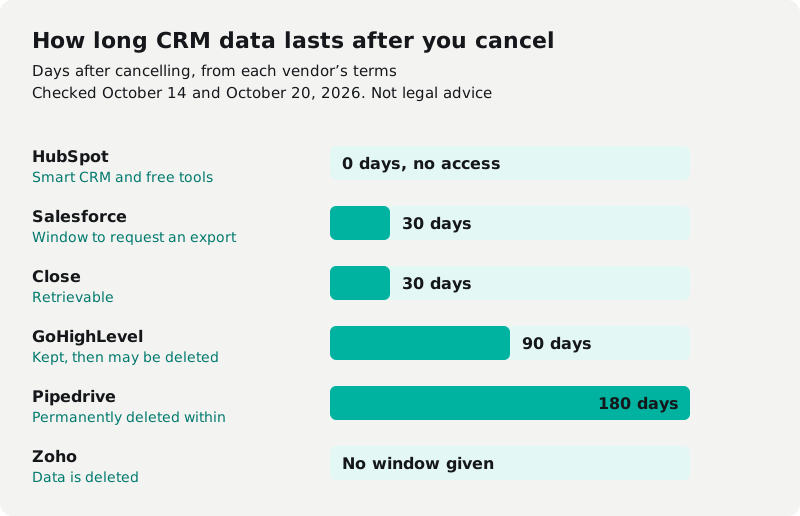
The pattern: ownership is rarely the problem. The window is. With HubSpot's free and Smart CRM tools, the window is zero, so export before you cancel, not after.
CRM data export: what it leaves out
Most exports are flat files, one object at a time: contacts in one file, deals in another, notes and activities somewhere else. Rebuilding the links between them is mostly on you.
- HubSpot exports one object at a time as CSV, XLS or XLSX, up to 300 exports in 24 hours, and download links expire after 30 days (HubSpot).
- Pipedrive: "Activities, notes and files linked to deals and contacts must be exported separately." Files stay available for 28 days (Pipedrive).
- Zoho's full backup leaves out email content and attachments, documents, and any data from integrations, and the link lasts 7 days (Zoho).
- GoHighLevel: "Exports do not include automation history," and each contact comes with only its latest note, up to 255 characters (GoHighLevel). Snapshots carry workflows and funnels only into another HighLevel account, one reason our GoHighLevel review says you rent the setup. If you're only trying it, read what the GoHighLevel trial bills and how to get out before day 14.
- Lofty emails a CSV of your leads as a download link, and after you cancel its terms give you 90 days to ask for your data in writing (Lofty). The contract terms that come with it are in Lofty's pricing and exit rules.
- Close: JSON is "the only format you can use to export all Activities" (Close).
We found no vendor page that promises you can export call recordings or your automations and workflows. Dialers are no better: ReadyMode recordings download one at a time (more on leaving ReadyMode).
CRM migration: moving your data to a new CRM
A CRM data migration is the export plus the import, and the import has its own limits:
- Salesforce's import wizard takes up to 50,000 records at a time (Trailhead).
- Pipedrive takes no more than 200,000 rows in a file under 50 MB (Pipedrive).
- HubSpot takes 1,048,576 rows per file on paid plans (HubSpot).
Run a test import with real records before you commit. Check that deals still point at the right contacts, that dispositions map to the new system's fields, and that dates come through in the right format. Leaving GoHighLevel? Its export drops automation history, so list your workflows before you go (GoHighLevel alternatives).
Four questions to ask before you pick a CRM data system
- Can I export everything, including activities, notes and call recordings?
- How many days do I have after I cancel?
- Who owns the data, in the contract itself?
- If the software is built for me, who owns the code?
The fourth question is why some teams own their CRM instead. When the system runs in your own cloud account, there's no export window: the data, the recordings and the code are already yours. That's how every Cleanform build works. To see what your rented stack costs now, add up your stack. For the rest of the buying decision, see our guide to CRM software for sales teams.
Book a free audit and we'll tell you what it would take to own yours.
Frequently asked questions
Do I own my data in a CRM?
In most of the contracts we read, yes. HubSpot, Pipedrive, Close and Zoho all say the customer keeps its data. The bigger question is how long you can still reach it after you cancel.
How long do I have to export my CRM data after I cancel?
It depends on the vendor. Salesforce gives 30 days to request an export, Close keeps data retrievable for 30 days, GoHighLevel keeps it for 90 days, and HubSpot gives no access to Smart CRM data after you cancel. Export before you cancel.
Can I export call recordings and automations from my CRM?
We found no vendor page that promises it. Most exports are flat files, one object at a time. Ask the vendor before you buy.