
Short answer
"Spam Likely" is what people call the warning a phone shows when a carrier's analytics think a number is unwanted, and each carrier words it its own way: Verizon shows Potential Spam, AT&T Spam Risk, T-Mobile Scam Likely. Your business number gets flagged on its call patterns and how people respond. You can check it, register it and ask for a review for free, but no one can force a label off or say how long it takes.
If your answer rate just fell and reps say your Spam Likely calls go unanswered, start here. Carriers and firms like Hiya, First Orion and TNS each run their own engine, so one number can be clean on Verizon and flagged on T-Mobile. Facts and prices were checked October 30, 2026. For the rest of the dialer picture, see our guide to auto dialers.
How does a number get flagged as spam?
A business number gets flagged as spam when a carrier's analytics engine decides its calls look unwanted, based on how the number calls and how people react. The signals are call volume and patterns, whether people answer and stay on the line, how often they block or report it, and how much history the number has. No carrier or analytics firm publishes the thresholds.
Each carrier labels on its own:
- Verizon shows Potential Spam for callers "calling indiscriminately or inappropriately to a large number of recipients", plus Robo Caller and Potential Fraud.
- AT&T shows Spam Risk and counts the numbers its customers report or block.
- T-Mobile shows Scam Likely, and also tags some calls Telemarketing or Potential Spam.
Behind them sit analytics firms. Hiya grades numbers A to D on four things in its reputation report card: maturity (do you call from established numbers, without rotating), connection, engagement and sentiment. It scores each call on its own and bases labels on at least the past week of calls, so a cleared number takes at least a week to lose its flag there.
The closest thing to a number is JustCall's guideline of 70 to 100 outbound calls a day per number, advice for its own dialer.
What do STIR/SHAKEN attestation levels change?
STIR/SHAKEN attestation levels A, B and C show how much your voice provider knows about you, and A-level helps but doesn't stop spam labels. In the FCC's terms (May 2026), A means the provider knows you and your right to the number, B means it knows you but not the number, and C means it only passed the call along.
The FCC itself has said a spam label "might not be related to the STIR/SHAKEN A-level attestation information they transmit" (FCC 25-76, October 2025). Ask your dialer which level your calls get. JustCall, for example, signs US calls at B-level until you complete its Business Profile.
How do you check if your number is flagged as spam?
You check if your number is flagged as spam by calling from it to phones on each major carrier and looking at the screen, because no single free lookup covers every carrier. Do three things:
- Test calls. Call from the number to a Verizon, an AT&T and a T-Mobile phone and note what each one shows. That's Hiya's own method, and results change by carrier, region and day.
- Watch answer rate by number. A number whose answer rate drops while the rest hold steady is the one to test first.
- Register every number so the analytics firms know it's a real business (next section).
We'd test any number whose answer rate drops, and the busiest numbers weekly. That's our habit, not a published rule.
Free Caller Registry
The Free Caller Registry is a free form that sends your business numbers to First Orion, Hiya and TNS in one go: up to 20 by hand, or a file under 100 KB. It doesn't show a number's status, and it "does not guarantee redress".
Spam call check and spam likely checker
A spam call check or spam likely checker website shows one analytics engine's view of a number, so treat it as a second opinion. A clean result there doesn't mean every carrier agrees.
How to remove Spam Likely from your number
You remove Spam Likely from your number by registering it free, asking each carrier or analytics firm for a review, and fixing whatever caused the flag, but no one can guarantee the label comes off or say when. Go in this order:
- Register first. The Free Caller Registry, then Hiya, which says to start with its free number registration. First Orion's registration is free too and feeds T-Mobile.
- Ask for a review where the label still shows. Verizon's spam feedback form takes up to 50 numbers at a time, with no promise the label changes. T-Mobile's call reporting site takes bulk uploads from businesses. Hiya offers a one-time review.
- Fix the cause. Slow the number down, clean the list and stop calling people who keep hanging up.
- Retire a number that keeps coming back flagged. Replace it with a fresh one and ramp it up slowly.
AT&T publishes no dispute process for business numbers that we could find. Its business call protection page says a report doesn't oblige AT&T to investigate.
Skip anyone selling guaranteed removal. Hiya, which runs one of the engines, says it plainly: "there's no quick fix."
How long does Spam Likely take to remove?
No carrier publishes how long removing a Spam Likely label takes. On Hiya it's at least a week, because labels rest on at least the past week of calls. Anything faster is a vendor's own claim, like PhoneBurner's times below.
Can you sue a carrier for flagging your number as spam?
The law gives a business very little when its number is flagged as spam, as opposed to blocked. The FCC said in 2020, "We decline to extend redress mechanisms to erroneous call labeling at this time" (FCC 20-187, para 79). Blocking is different: under 47 CFR 64.1200(k)(8), a carrier that blocks calls must publish a contact for blocking complaints and can't charge you to make one. This is not legal advice. The calling rules themselves are in our TCPA rules for sales calls.
How to avoid being flagged as spam again
You avoid being flagged as spam again by calling from steady, registered numbers at a pace your answer rate can carry, and by resting or retiring a number that gets flagged instead of churning through new ones. Our calls:
- Don't rotate numbers to dodge labels. Hiya grades maturity on whether you call from established numbers without rotating, so a fresh number every week starts at the bottom of that grade. Calling from numbers you own isn't spoofing, since the FCC's spoofing rule turns on intent to defraud or cause harm. Churn just makes every number look new.
- Rest a flagged number, then bring it back slowly. Replace it if it gets flagged again.
- Keep the caller name (CNAM) matching your business.
- Pace each number. Slow down the moment its answer rate drops.
- Consider branded caller ID. CTIA's Branded Calling ID shows a vetted business name, logo and call reason, and needs A-level attestation. It helps people recognize you but doesn't remove a label.
When we ran ReadyMode, answering machine detection left a pause after people said hello. Our numbers got flagged as spam, and that burned more leads.
Dialers that watch for Spam Likely labels, and what they cost
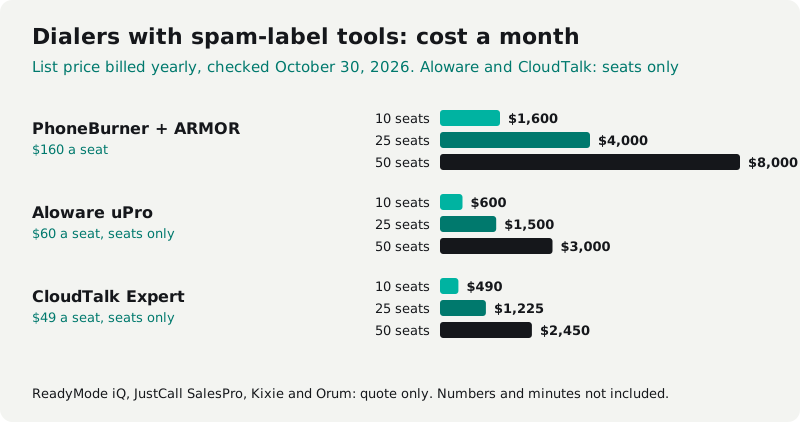
Dialers that watch number health charge for it as a higher plan or an add-on, and none of them guarantees a label stays off. ReadyMode admits no platform can fully prevent spam labeling, and CloudTalk puts it bluntly: "No solution can guarantee that." Most hide the add-on price.
| Vendor and plan | What it does about spam labels | 10 seats | 25 seats | 50 seats |
|---|---|---|---|---|
| ReadyMode iQ | Reputation monitoring with assisted remediation; 75 numbers per license | Quote only | Quote only | Quote only |
| PhoneBurner Standard + ARMOR, billed yearly | Carrier registration, monitoring and remediation, $5 a number | $1,600 | $4,000 | $8,000 |
| Aloware uPro, billed yearly | NumberGuard scans and mislabel resolution, add-on price not published | $600 + add-on | $1,500 + add-on | $3,000 + add-on |
| JustCall SalesPro | Number Health status for every number; you replace flagged numbers by hand | Quote only | Quote only | Quote only |
| Kixie | ConnectionBoost add-on: local presence, reputation management, flagged pool numbers swapped | Quote only | Quote only | Quote only |
| Orum | Carrier registration and Hiya remediation; 9-seat minimum | Quote only | Quote only | Quote only |
| CloudTalk Expert, billed yearly | Numeracle monitoring and remediation add-on, by quote | $490 + add-on | $1,225 + add-on | $2,450 + add-on |
| Cleanform, owned, no seat fees | Number health built into the dialer | $0 | $0 | $0 |
Cleanform is $0 a seat at any team size: you pay monthly for the build until it's paid off, then mostly hosting. How pricing works.
List prices from each vendor's page, October 30, 2026. PhoneBurner's row uses its own average of 4 numbers a seat: $140 plus 4 × $5 ARMOR = $160. Aloware and CloudTalk are seats only, since neither prices its spam add-on.
What each one sells:
- ReadyMode puts monitoring on iQ, with 75 numbers per license. Its pricing page no longer shows prices. When we used it we paid about $250 a seat, spam-flag monitoring included (ReadyMode alternatives).
- PhoneBurner sells ARMOR at $5 a month per number, on PhoneBurner numbers only, and quotes about 2 to 3 business days to clear AT&T and T-Mobile flags, about 21 for Verizon.
- Aloware sells spam label removal as an add-on on uPro ($60 a user yearly, $70 monthly) and xPro. Its NumberGuard service disputes labels with carriers, typically in a few business days.
- JustCall rates every number Healthy, Learning, At Risk or Mitigating Risk. Fix recommendations are for SalesPro, which is quote only, and JustCall is clear that its carrier registration doesn't permanently prevent labels.
- Kixie publishes no prices. ConnectionBoost swaps a flagged number in Kixie's shared pool for a fresh one automatically. See how Kixie and Aircall price their spam tools.
- Orum is quote-only with a 9-seat minimum. In May 2026 it added carrier registration and Hiya remediation.
- CloudTalk Expert is $49 a user billed yearly (3 users minimum). Its Numeracle add-on is by quote and takes about three weeks from start to finish.
Local presence (calling from the person's area code) isn't a spam fix: we found no carrier or analytics source that ties it to fewer flags.
When owning the dialer makes sense
Owning the dialer makes sense when your dialer, CRM and the tools joining them cost about $2,000 to $3,000 a month or more, so number health lives in the system your reps dial from instead of a paid add-on. Under $1,000 a month, keep renting.
On a rented dialer, a flag still means tickets and swapping numbers by hand. The dialers we build watch their own numbers. A nightly check reads each number's spam label on every carrier. If one carrier flags a number, the dialer stops calling that carrier from it and keeps using it on the others. Flagged everywhere, it's rested and brought back slowly, and a number flagged twice is retired and replaced. New numbers start at a low daily call limit and ramp up. It's all in the system your reps dial from, with no separate monitoring tool. It can't promise a label never lands, but nobody has to go looking.
One sales floor we built for paid about $4,500 a month for eight closers on a per-seat dialer, a per-seat CRM, a scheduling tool and a Zap. Now they run one system they own for about $300 a month in hosting and $0 per added seat (the dialer and CRM case study).
An owned system typically costs less than you spend on software today, paid monthly, and the build payments have an end date. You get the code, the data and the IP. Here's how pricing works.
Sources
Checked October 30, 2026.
- Verizon Call Filter FAQs and Verizon spam feedback form
- AT&T ActiveArmor terms and AT&T business call protection
- T-Mobile scams, spam and fraud and T-Mobile call reporting
- Hiya: reputation report card, how to check numbers, reputation data, labeled as spam: how to fix it, what to do next
- Free Caller Registry and First Orion free number registration
- FCC 20-187, FCC 25-76, FCC 26-32, 47 CFR 64.1200, 47 CFR 64.1604
- CTIA Branded Calling best practices
- ReadyMode pricing, ReadyMode iQ and DID reputation monitoring
- PhoneBurner pricing and ARMOR FAQ
- Aloware pricing and NumberGuard
- JustCall: number health, managing number health, phone number reputation, pricing, avoid spam
- Kixie pricing and ConnectionBoost
- Orum pricing and Orum and Hiya
- CloudTalk pricing and CloudTalk number reputation
The SaaS cost calculator adds up your whole stack in about two minutes. If it comes out at a few thousand a month, book a free audit and we'll show you what one owned system would replace.
Frequently asked questions
Is my number flagged as spam?
No single place shows it. Call from the number to phones on Verizon, AT&T and T-Mobile and note what each screen shows, watch for a sudden drop in answer rate, and register the number on the Free Caller Registry so the analytics firms know it's yours.
How does a number get flagged as spam?
Carriers and their analytics partners score every number on how it calls: how many people it reaches, whether they pick up and stay on, and how often they block or report it. A new number with little history is easy to flag. No carrier or analytics firm publishes the threshold.
How do I remove Spam Likely from my number?
Register the number free with the Free Caller Registry and with Hiya, then send a review request through each carrier's form: Verizon's spam feedback form, T-Mobile's call reporting site and Hiya's review. No one can guarantee a label comes off, or say how long it takes.
What does flagged as spam mean for a business?
The person you call sees a warning such as Potential Spam, Spam Risk or Scam Likely before they answer, and many won't pick up. It isn't a legal finding. The FCC has said labeling isn't the same as blocking and hasn't given callers a formal right to dispute a label.
Does A-level STIR/SHAKEN attestation stop spam labels?
No. A-level attestation tells the carrier your provider knows you and your right to the number, and it helps. But the FCC has said a spam label might not be related to the A-level attestation a provider sends, so it isn't a fix by itself.
Is it cheaper to own the dialer than pay for number health?
It depends on what you spend. If your dialer, CRM and the tools joining them cost under $1,000 a month, keep renting. From about $2,000 to $3,000 a month, an owned dialer with number health built in is worth pricing.