

Short answer
Kixie and Aircall solve different problems. Kixie is a sales phone built around its PowerDialer: reps work through call lists, one line at a time or up to four at once, with the CRM updating as they go. Aircall is a business phone system for sales and support teams, with a Power Dialer added on its Professional plan.
If your team mostly makes outbound calls, Kixie is built for that. If you also route inbound calls, run support queues or want a price you can see before talking to sales, Aircall fits better.
Our take: Kixie is probably the better software, and if you run on GoHighLevel it has the better integration of the two, because it's native. But man, is it expensive.
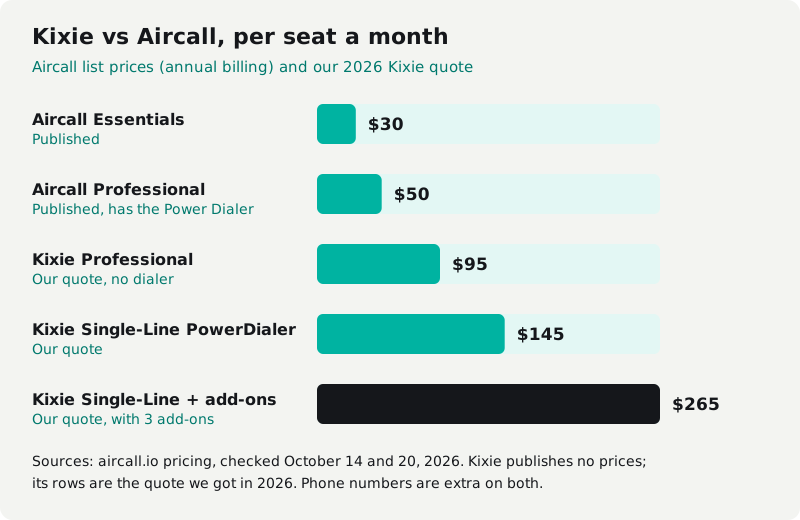
On cost, only one of them shows its hand. Aircall publishes $30 and $50 per license a month. Kixie publishes no prices at all; when we asked for a quote in 2026, it came back at $95 to $145 a seat, and over $200 with the extras.
And for both, the seat is only the start of the bill. If your phones, CRM and the tools tying them together already cost $2,000 to $3,000 a month or more, there's a third option at the end of this post: own the system instead of renting it.
Prices and plan details are from each vendor's own pages, checked October 14, 2026 and re-checked October 20, 2026.
What is Kixie, and how is it different from Aircall?
Kixie is for outbound sales teams; Aircall is a phone system that also does outbound. That shows up in how each one sells its plans.
Kixie's three plans are Professional, Single-Line PowerDialer and Multi-Line PowerDialer. Every plan includes the business phone line, two-way CRM sync, texting, voicemail drop, live call coaching, call recording and unlimited US and Canada minutes. The plans differ by how many lines the dialer runs.
Aircall's plans are Essentials, Professional and Enterprise. Essentials covers calls, texts, IVR menus, a shared inbox and recordings. Professional adds the Power Dialer, outbound campaigns, smart routing and call monitoring. Enterprise adds unlimited global calls, single sign-on and an enterprise SLA.
Kixie pricing vs Aircall pricing at 10, 25 and 50 seats
Aircall's base licenses run $300 to $2,500 a month across 10 to 50 seats. Kixie doesn't publish prices, so the Kixie rows use the quote we got in 2026: $95 a seat for Professional, $145 for the Single-Line PowerDialer, and more than $200 for multi-line dialing or AI voice detection. Yours may differ. Here's the monthly cost for the seats alone (Aircall on annual billing):
| Plan | 10 seats | 25 seats | 50 seats |
|---|---|---|---|
| Aircall Essentials, $30 a license | $300 | $750 | $1,500 |
| Aircall Professional, $50 a license | $500 | $1,250 | $2,500 |
| Aircall Professional + AI Assist Pro ($49 a seat) | $990 | $2,475 | $4,950 |
| Aircall Enterprise | Not offered under 25 | Quote only | Quote only |
| Kixie Professional (our quote, $95 a seat) | $950 | $2,375 | $4,750 |
| Kixie Single-Line PowerDialer (our quote, $145 a seat) | $1,450 | $3,625 | $7,250 |
| Kixie Multi-Line or AI voice detection (our quote, $200+ a seat) | $2,000+ | $5,000+ | $10,000+ |
| Kixie Single-Line + DNC, ConnectionBoost and AI analysis (our quote, $265 a seat) | $2,650 | $6,625 | $13,250 |
| Cleanform, owned, no seat fees | $0 | $0 | $0 |
Cleanform is $0 a seat at any team size: you pay monthly for the build until it's paid off, then mostly hosting. How pricing works.
Over three years, if the list price holds:
| Plan | 10 seats | 25 seats | 50 seats |
|---|---|---|---|
| Aircall Essentials | $10,800 | $27,000 | $54,000 |
| Aircall Professional | $18,000 | $45,000 | $90,000 |
| Kixie Professional (our quote) | $34,200 | $85,500 | $171,000 |
| Kixie Single-Line PowerDialer (our quote) | $52,200 | $130,500 | $261,000 |
What those tables leave out:
| Aircall | Kixie | |
|---|---|---|
| Seat minimum | 3 licenses (Enterprise 25) | Not published |
| Monthly billing | Costs more; annual saves 25% | Not published |
| Extra phone numbers | $6 a month each after the first | Not published; not in our quote |
| Texting rates | "Contact us" | Not published |
| Add-ons | Analytics+ $15 a seat; AI Assist Pro $49 a seat; branded caller ID $0.08 a call; Number Reputation $0.03 a check | No prices listed. Our 2026 quote, per seat a month: DNC checks $20; ConnectionBoost (spam detection and local presence) $50; AI call analysis $50 |
| Contract terms | Not on the pricing page | Not on the pricing page |
The seat is rarely the whole bill, on either one. Aircall's Local Presence is included on Professional, but it only dials from local numbers you've bought, and each extra number is $6 a month. When we ran a team on Aircall in early 2026, those local numbers came to about $250 to $300 a month, and spam reputation management was another charge on top. Kixie was the same story. On the quote we got, automated do-not-call checks were $20 a seat, spam detection and local presence another $50, and AI call analysis another $50. So staying compliant with local presence adds $70 a seat straight away, and adding transcripts and AI analysis takes the add-ons to $120 a seat, on top of the plan and before phone numbers. We demoed Kixie and got that quote, but never ran a team on it.
For the same numbers across more dialers and CRMs, see our sales software pricing index.
Kixie power dialer vs Aircall power dialer: which is better?
Kixie's, if you want speed. Its Multi-Line PowerDialer runs up to 4 lines at once. That's parallel dialing: the first person to answer goes to the rep. It gets reps through a list much faster than ringing one number at a time, the way a single-line power dialer does.
Kixie also sells AI Human Voice Detection to skip voicemails. Its pricing page lists it as a premium add-on with the Multi-Line plan, so check your quote for it.
If you've seen the name Kixie PowerCall, it's this same dialer. Kixie's PowerCall page calls it an advanced sales dialer and lists multi-line dialing, AI local presence, automatic CRM logging and voicemail drops. Kixie's pricing page has no PowerCall plan. The dialer is sold as the Single-Line and Multi-Line PowerDialer plans, so that's what to ask for in a quote. Local presence came as part of ConnectionBoost on the quote we got, at $50 a seat on top.
Aircall's Power Dialer calls one number at a time from a list of up to 1,000, with wrap-up time between calls for notes and tags. It runs on desktop and web, not the mobile app, and only on Professional. If you'd rather have parallel dialing with a published price, look at Aircall vs CloudTalk.
Here's what we ran into when we used Aircall. Power dialing needed a campaign set up for each rep, so with 30 reps we kept 30 campaigns going by hand. That was a lot of manual work.
Today's docs still have each agent manage their own Power Dialer list. Aircall has since added Outbound Campaigns, where an admin assigns several agents to one shared list. It's in beta on Professional, at no extra cost.
The thing Aircall does better is the screen itself. Of every dialer and phone system we've used, Aircall had the best interface.
Aircall integrations vs Kixie: HubSpot, Salesforce and GoHighLevel
Both connect to the big sales CRMs. Kixie has native integrations with HighLevel, HubSpot, Salesforce, Pipedrive and Zoho, and two-way CRM sync is on every plan. Aircall's integrations directory covers HubSpot, Salesforce, Pipedrive, Zoho CRM, HighLevel, Microsoft Dynamics and more. On Aircall, the Salesforce integrations need Professional or above.
If you run on GoHighLevel, this is where the two split. Kixie's HighLevel integration is native. Aircall's is built by a partner, Airlinx, and Aircall says it "may incur a cost." When we ran Aircall with GoHighLevel, the connection ran through the API, and it was pretty weak. The partner integration now lists call and SMS logging, outcomes and workflow triggers, so if you're weighing Aircall on GoHighLevel, ask Airlinx for its price and test it on a trial.
If calls and outcomes have to land in the CRM for your reporting to work, test that on a trial. Our guide to sales dialers explains the dialing types and what to check.
Kixie ConnectionBoost vs Aircall spam monitoring
Neither stops spam labels on its own; both sell add-ons to help. Before you pay for one, try the free ways to check if your number is flagged as spam. Aircall's Number Reputation checks each enrolled number every day and marks it Healthy, Risk or Spam in the dashboard, so reps can avoid flagged numbers. It's billed by usage, at $0.03 per reputation check, and Aircall says plainly that neither it nor branded caller ID can guarantee a label gets removed. Every domestic Aircall call in the US and Canada is signed with at least B-level STIR/SHAKEN attestation.
Kixie's answer is ConnectionBoost, a premium add-on on its pricing page, which pitches it as better connection quality and fewer dropped calls. No price is listed. On the quote we got in 2026, it covered spam detection and local presence for $50 a seat a month. Ask what it checks and how often before you count on it.
TCPA compliance and the do not call list: do Kixie and Aircall handle it?
No. Both leave the legal side to you.
Aircall's campaign docs say consent management is your organization's responsibility. Calling hours and DNC lists are on you too, and taking a number off future campaigns after a do-not-call outcome is still manual. Kixie sells a DNC add-on (we were quoted $20 a seat a month), but a tool that flags numbers doesn't move the responsibility: who you call is still on you.
What the rules actually require is in our TCPA rules for sales calls. This isn't legal advice.
Aircall transcription vs Kixie: can you get call transcripts out?
With Aircall, yes. Recording and transcription are included in Essentials and Professional, and its API reference has an endpoint for a call's transcription plus a webhook when one is ready. The pricing table ties the AI and transcription API to AI Assist, so confirm which package you need. We found the API hard to work with when we used it.
Kixie puts transcripts in its Conversation Intelligence add-on, which we were quoted at $50 a seat a month. Every plan includes a developer API. Ask Kixie how to get transcripts out before you plan coaching or AI work around them.
Kixie vs Aircall: pros and cons
Kixie pros: probably the better sales software of the two, from our demos; native GoHighLevel integration; built around outbound calling; dials up to 4 lines at once; two-way CRM sync on every plan; unlimited US and Canada minutes; a 7-day free trial with no card.
Kixie cons: no published prices, and the quote we got ran $95 to over $200 a seat; the Professional plan has no dialer; DNC, spam and local presence, and AI analysis add up to $120 a seat more, before phone numbers.
Aircall pros: published prices; the cleanest interface we've used; one phone system for sales and support; transcription in the plan, with an API for it.
Aircall cons: the GoHighLevel integration is partner-built and may cost extra (and was weak when we used it); 3-license minimum; the Power Dialer is only on the $50 plan and calls one number at a time; each extra local number for local presence is $6 a month; spam monitoring, AI and advanced analytics cost extra.
Kixie alternatives: what else should you compare?
The main Kixie alternatives are Aircall, CloudTalk and a predictive dialer, depending on how you call.
- Aircall: for prices you can see before a sales call, and one phone system for sales and support. You give up parallel dialing. If Aircall itself is what you're leaving, see the Aircall alternatives priced at 10, 25 and 50 seats.
- CloudTalk: for parallel dialing without a quote. It sells a Parallel Dialer add-on on any plan. See how it stacks up in Aircall vs CloudTalk.
- ReadyMode and other predictive dialers: for a call floor working big lists, where a power dialer is too slow. The ReadyMode alternatives roundup covers them.
Custom dialer: should you rent Kixie or Aircall, or own it?
If your phones, CRM and the glue between them cost under $1,000 a month and they work, keep what you have. Pick whichever of these two fits your calls. Owning starts to pay when the stack runs a few thousand a month and grows with every hire. Hire 10 reps and maybe 3 or 4 stick, but you pay for every seat on the way.
One client's sales floor ran a per-seat dialer, a per-seat CRM, a scheduling tool and a Zap to keep them talking. That came to about $4,500 a month for eight closers, and every new rep was a $560-a-month decision. The Zap broke whenever a vendor shipped an update.
We replaced all four with one system: dialer, script, dispositions, pipeline and the closer's day on one screen, in a cloud account the business owns. Hosting runs about $300 a month, and an added seat costs $0. Read the case study.
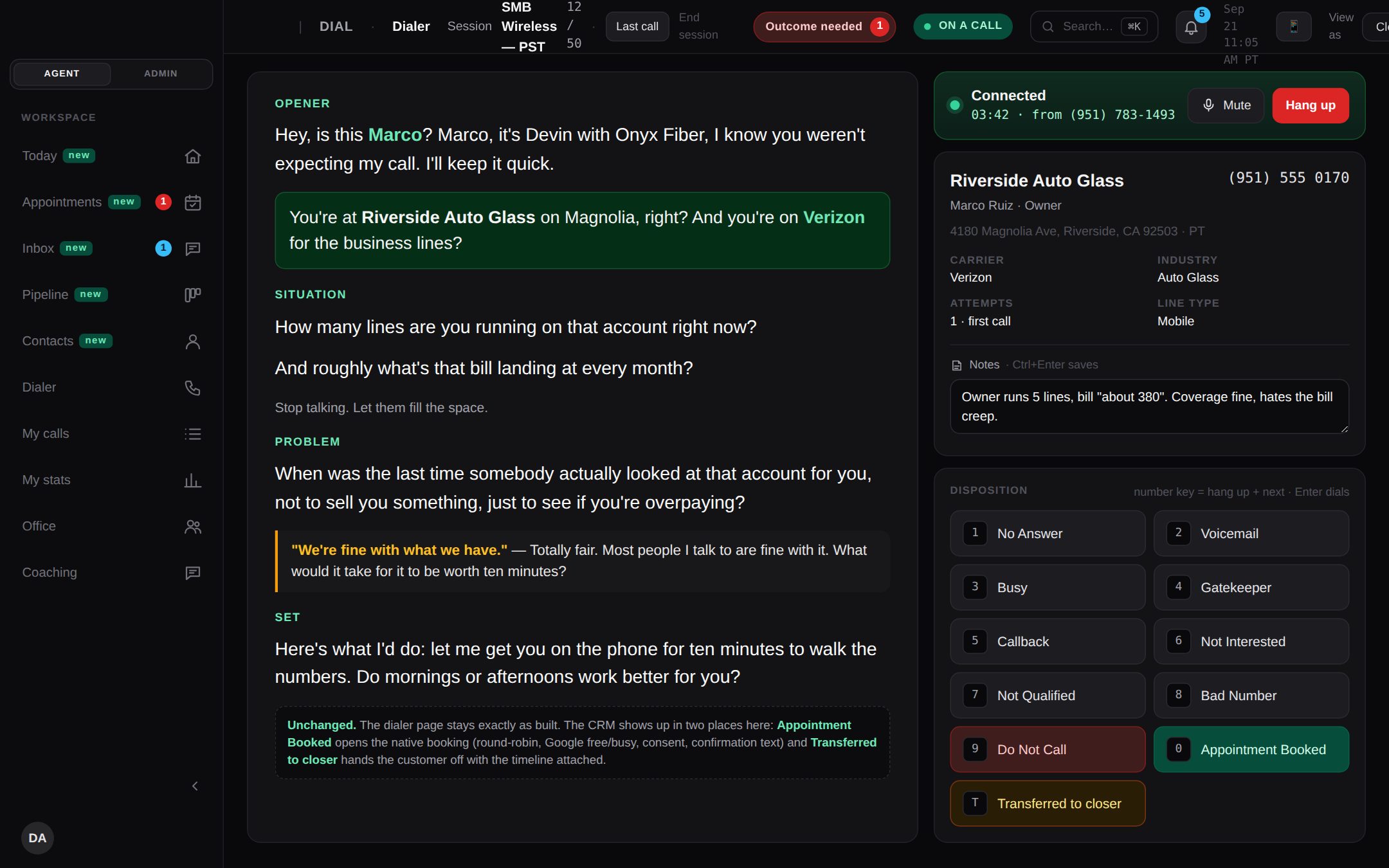
The dialers we build also watch their own numbers. A nightly check reads each number's spam label on every carrier. If a carrier labels a number as spam, the dialer stops calling that carrier from it, and a number flagged twice is retired and replaced. It's all in the same system your reps dial from.
How it's paid for: typically less than you spend today, paid monthly, and the build payments have an end date. There are no seat fees, and you get the code, the data and the IP. Here's how pricing works. For the bigger build-or-buy question, see custom CRM development.
Kixie vs Aircall: which should you pick?
- Mostly outbound, and speed matters: Kixie. Get a written quote, including add-ons, before you compare.
- You run on GoHighLevel: Kixie, for the native integration, if the add-on bill still works for you.
- Inbound and outbound, sales and support: Aircall Professional. Price in the extras you'll need, like local numbers and spam monitoring.
- A call floor that needs predictive dialing: neither. Look at ReadyMode and the call-center dialers that compete with it.
- A few thousand a month on phones, CRM and glue, climbing with every hire: look at owning.
The SaaS cost calculator adds up your stack in about two minutes. If it comes out at a few thousand a month, book a free audit and we'll show you what one system would replace.
Frequently asked questions
Is Aircall good for outbound sales calls, or is Kixie better?
Kixie, if outbound calling is most of the job. Its PowerDialer plans dial one line or up to four at once. Aircall's Power Dialer is only on its Professional plan and calls one number at a time, but Aircall is the better fit if you also take inbound and support calls. From our demos, Kixie is probably the better software for a sales team, but it's expensive once you add the extras.
Do Kixie and Aircall integrate with GoHighLevel?
Both do, but not the same way. Kixie lists HighLevel CRM as a native integration. Aircall's HighLevel integration is built by a partner, Airlinx, and Aircall says it may cost extra. When we ran Aircall with GoHighLevel, the connection ran through the API and it was pretty weak.
What is Kixie PowerCall?
PowerCall is Kixie's name for its sales dialer: multi-line dialing, AI local presence, automatic CRM logging and voicemail drops. There's no PowerCall plan on Kixie's pricing page; the dialer is sold as the Single-Line and Multi-Line PowerDialer plans.
Does Aircall have a power dialer?
Yes, on the Professional plan and up. It dials an imported list of up to 1,000 numbers in order, from the desktop or web app. The Essentials plan doesn't include it.
How much does Aircall cost per user?
Aircall lists $30 per license a month for Essentials and $50 for Professional, billed annually, with a 3-license minimum. Monthly billing costs more. Enterprise is a custom quote and starts at 25 licenses.
How much does Kixie cost?
Kixie doesn't publish prices, so you need a quote. When we asked in 2026, we were quoted $95 a seat a month for Professional and $145 for the Single-Line PowerDialer. Multi-line dialing or AI voice detection pushed it past $200 a seat. Add-ons were extra per seat: $20 for DNC checks, $50 for ConnectionBoost (spam detection and local presence) and $50 for AI call analysis.
How do I remove Spam Likely from my number on Aircall or Kixie?
Neither can promise to remove it, but both sell add-ons that show which numbers are flagged, priced on top of the seat. Aircall's Number Reputation shows each number as Healthy, Risk or Spam in the dashboard; Kixie sells ConnectionBoost, which its quote to us bundled with local presence. Aircall lists Number Reputation at $0.03 per reputation check. Kixie publishes no price for ConnectionBoost; it quoted us $50 a seat a month in 2026. Aircall says it can't guarantee a label gets removed.
What are the best Kixie alternatives?
Aircall, if you also take inbound and support calls and want published prices. CloudTalk, if you want parallel dialing sold as an add-on on any plan. A predictive dialer such as ReadyMode, if you run a call floor. And if your phones and CRM cost a few thousand a month, owning one system can beat renting any of them.
Can you get call transcripts from the Aircall API?
Aircall's API documents an endpoint for a call's transcription and a webhook when one is ready. Its pricing table ties the AI and transcription API to AI Assist, so confirm which package you need before you buy.