

Short answer
CloudTalk pricing starts at $25 a user a month on annual billing, against $30 a license for Aircall with a 3-license minimum. Both are cloud phone systems with CRM sync, and on seat price they're close. The difference is the dialer.
Aircall is one phone system for sales and support, with a one-line Power Dialer on its Professional plan. CloudTalk is built for outbound. Power and parallel dialing come as add-ons, or with its top plan.
Pick Aircall if you take inbound calls as well as making them, want fewer add-ons to track, and one call at a time is enough. CloudTalk suits a team where outbound volume is the job. You get parallel dialing, and you pay for it in add-ons stacked on the seat. At list price, a 10-seat team with a dialer pays about $440 to $500 a month on either one. At 50 seats it's about $2,200 to $2,500, before numbers and extras.
If your phones, dialer, CRM and the glue between them already cost $2,000 to $3,000 a month or more, there's a third option at the end: own the system instead of renting it.
We used both for a couple of months each. Prices and plan details are from each vendor's own pages, checked October 20, 2026.
What is CloudTalk, and how is it different from Aircall?
CloudTalk is a cloud phone system that leans toward outbound sales. Aircall runs inbound and outbound on one system.
Aircall's plans are Essentials, Professional and Enterprise. Essentials covers calls, texts, IVR menus and recording. Professional adds the Power Dialer, smart routing, advanced analytics and AI call summaries. Enterprise adds single sign-on and unlimited international calls, and starts at 25 licenses.
CloudTalk sells Starter, Essential and Expert. Every one includes unlimited US and Canada calling, anti-spam number registration and recording. Essential adds the standard CRM integrations and keeps recordings with no time limit (Starter keeps them 1 month). Expert includes the Power Dialer.
Of every dialer and phone system we've used, Aircall had the best interface.
CloudTalk pricing vs Aircall pricing at 10, 25 and 50 seats
CloudTalk's price runs from $25 to $49 a user a month on annual billing, and Aircall's from $30 to $50 a license. Neither entry price gets you a dialer. Aircall's needs the $50 Professional plan. CloudTalk's needs Expert at $49, or Essential at $29 plus the $15 Power add-on. Parallel dialing on CloudTalk is a $39 add-on.
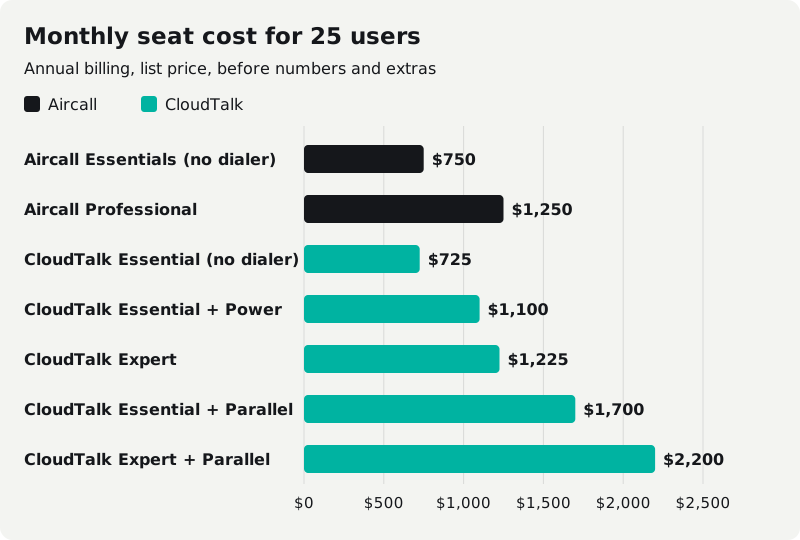
Monthly cost for the seats alone, annual billing, US dollars:
| Plan | 10 seats | 25 seats | 50 seats |
|---|---|---|---|
| Aircall Essentials, $30 (no dialer) | $300 | $750 | $1,500 |
| Aircall Professional, $50 (Power Dialer) | $500 | $1,250 | $2,500 |
| Aircall Enterprise | Not offered under 25 | Quote only | Quote only |
| CloudTalk Essential, $29 (no dialer) | $290 | $725 | $1,450 |
| CloudTalk Essential + Power, $44 | $440 | $1,100 | $2,200 |
| CloudTalk Expert, $49 (Power included) | $490 | $1,225 | $2,450 |
| CloudTalk Essential + Parallel, $68 | $680 | $1,700 | $3,400 |
| CloudTalk Expert + Parallel, $88 | $880 | $2,200 | $4,400 |
| Cleanform, owned, no seat fees | $0 | $0 | $0 |
Cleanform is $0 a seat at any team size: you pay monthly for the build until it's paid off, then mostly hosting. How pricing works.
CloudTalk's help center says the Parallel add-on includes everything in the Power add-on, so the table doesn't charge both. Get that in writing on your quote.
Over three years, if list prices hold:
| Plan | 10 seats | 25 seats | 50 seats |
|---|---|---|---|
| Aircall Professional | $18,000 | $45,000 | $90,000 |
| CloudTalk Essential + Power | $15,840 | $39,600 | $79,200 |
| CloudTalk Expert | $17,640 | $44,100 | $88,200 |
| CloudTalk Essential + Parallel | $24,480 | $61,200 | $122,400 |
What the tables leave out:
| Aircall | CloudTalk | |
|---|---|---|
| Monthly billing | Not listed; annual saves 25% | $34, $39 or $69 a user |
| Seat minimum | 3 (Enterprise 25) | 1 (Expert 3) |
| Phone numbers | 1 included, then $6 a month each | $6 a month each, $0 activation |
| US and Canada calling | Unlimited (terms apply) | Unlimited, capped at 3,000 outbound minutes a user a month by default |
| Texting | Contact us for rates | Not in the plan; paid from prepaid credit |
| AI add-on | AI Assist Pro, $49 a seat | Conversation Intelligence, $9 a user |
Watch the contract on both. CloudTalk's annual plan is a 12-month commitment, paid in advance and not refundable, and its terms say "CloudTalk does not send any reminders before the Customer is charged again." Aircall asks annual and committed accounts for written notice at least 30 days before renewal. Put the renewal date in your calendar either way.
The same numbers for more dialers and CRMs are in our sales software pricing index.
CloudTalk dialer vs Aircall power dialer
CloudTalk gives you more ways to dial. Aircall has one mode and keeps it simple. Neither publishes a predictive dialer (the vendors that do sell predictive, and their seat prices).
Aircall's Power Dialer calls a list of up to 1,000 numbers in order, one at a time, with wrap-up time between calls for notes and tags. It runs in the desktop and web app, not on mobile, and only on Professional.
When we used Aircall, power dialing needed a campaign set up for each rep. With 30 reps, that was 30 campaigns we kept up by hand. Today's docs still give each rep their own Power Dialer list. Aircall has added Outbound Campaigns, where an admin puts several agents on one shared list. Agent campaigns are in beta on Professional, at no extra cost.
CloudTalk's Power add-on also dials one contact at a time. It's included in Expert and $15 a user on the other plans.
The best thing CloudTalk did for us was its Chrome extension. It turns the phone numbers on any web page into click-to-call links, and it can send every number on the page to CloudTalk's Smart Dialer queue. It was really easy to use, and we could power dial from any list, even a spreadsheet full of numbers.
CloudTalk parallel dialer: how many lines?
The Parallel Dialer rings 2 to 5 numbers at once per rep (you set it per campaign), detects voicemail, and connects the first person who answers. Up to 10 lines can be turned on for some accounts on request. The pricing page says "up to 10", so ask which you'll get. It costs $39 a user on any plan, including Expert, and each rep using it needs a Parallel Calling seat.
CloudTalk is also moving to a new AI Sales Dialer and phasing out the older ones, and the new one is switched on account by account. Before you buy, ask which one your account will run on.
What parallel dialing is, and the rules that come with it, are in our guide to sales dialers.
Aircall local presence and CloudTalk spam tools
You can buy help with spam labels from either vendor. Neither can promise your numbers stay clear of "Spam Likely." The free steps, registering your numbers and asking each carrier for a review, are in our guide to why business numbers get flagged as spam.
Aircall's Local Presence is included on Professional and above. It calls from whichever of your numbers best matches the area code you're dialing, and it only uses numbers you already have. So local presence itself costs nothing extra, but you pay $6 a month for every local number it dials from. For us that came to about $250 to $300 a month in early 2026, and spam reputation management was extra on top. Number Reputation, which checks your numbers' spam status every day, is a separate add-on at $0.03 per check. Branded caller ID is $0.08 a call, US numbers only. And neither one can guarantee a spam label comes off.
CloudTalk registers your outbound numbers with the carriers on every US plan. Branded caller ID starts at $0.07 a call on the pricing page. For bigger teams it sells Spam Remediation, run with Numeracle, at a custom price, aimed at teams making 70 or more calls a day per agent. Warm up new numbers with a few days of normal calls before you run campaigns from them.
Neither one takes the calling rules off your plate. Aircall's campaign docs put consent, calling hours and do-not-call list management on your organization. CloudTalk's pricing page lists no do-not-call tool, so ask before you count on one. What the rules require is in our TCPA rules for sales calls. This isn't legal advice.
CloudTalk HubSpot integration vs Aircall integrations
Both connect to HubSpot, Salesforce, Zoho and Pipedrive. They split on GoHighLevel and on how much API you get.
CloudTalk lists certified apps for HubSpot, Salesforce and Zoho CRM, with two-way sync. The standard integrations start on Essential, not Starter, and so do webhooks. Its API allows 60 requests a minute per company.
Where CloudTalk did worst for us, when we used it, was syncing calls back into our own software. The certified apps above may have closed that gap, so test the sync with your own CRM before you sign.
Aircall's directory lists hundreds of apps, HubSpot, Salesforce, Zoho CRM and Pipedrive among them. Full API access is on Professional, at 120 requests a minute per company. We found Aircall's API hard to work with when we used it.
CloudTalk's HighLevel integration is still in development and not yet available, with no launch date. Aircall's is built by a partner, Airlinx, and Aircall says it "may incur a cost." When we ran Aircall with GoHighLevel, the connection ran through the API and it was pretty weak. Kixie's HighLevel integration is native; see how Kixie and Aircall compare.
CloudTalk reviews vs Aircall reviews: pros and cons
CloudTalk reviews better than Aircall on Trustpilot: 4.2 out of 5 from 872 reviews, against 3.0 from 1,091 for Aircall, checked October 20, 2026. The gap is the one-star tail. 29% of Aircall's reviews are one star, against 15% of CloudTalk's.
Both get the same praise: easy to use and quick to set up. CloudTalk's complaints are slow fixes for harder technical issues, needing the team's help to change a subscription, and billing by the minute. Aircall's are slow support after the sale, bugs after updates, and billing and cancellation disputes. Trustpilot doesn't fact-check reviews, so read them for patterns, and read the contract terms above before you sign either one.
Aircall pros: the best interface we've used; one phone system for sales and support; one number included; Local Presence included on Professional; a simple one-list Power Dialer.
Aircall cons: 3-license minimum; every local number costs $6 a month; the Power Dialer is only on the $50 plan and calls one number at a time; no parallel dialing; spam monitoring, AI Assist Pro and Analytics+ cost extra; monthly prices aren't listed; the HighLevel integration is partner-built and may cost more.
CloudTalk pros: lower entry prices; power and parallel dialing; a Chrome extension that dials from any web page or list; anti-spam number registration on every US plan; a cheap AI add-on at $9 a user; managed spam remediation for high-volume teams.
CloudTalk cons: syncing back into our own software was weak when we used it; the dialer is an add-on unless you're on Expert; the dialer itself is mid-change; annual plans are paid upfront with no refund and no renewal reminder; a 3,000-minute default cap per user; texting runs off prepaid credit; no GoHighLevel integration yet.
Aircall alternatives and CloudTalk alternatives
If neither fits, the next names to look at (the full list, with seat costs, is in our Aircall alternatives guide):
- JustCall: from $29 a user a month on its Team plan, billed annually, 2-user minimum.
- Quo (formerly OpenPhone): from $19 a user a month, billed annually. A business phone for small teams more than a dialer.
- Kixie: no published prices. Built for outbound, with a native HighLevel integration. We cover it in Kixie vs Aircall.
- Predictive dialing for a call floor: neither Aircall nor CloudTalk does it. Look at the call-center dialers that compete with ReadyMode.
Custom dialer: should you rent Aircall or CloudTalk, or own it?
If your phones, CRM and the glue between them cost under $1,000 a month and they work, keep what you have, and pick whichever of these two fits your calls. Owning starts to pay when the stack runs a few thousand a month and climbs with every hire. Hire 10 reps and maybe 3 or 4 stick, but you pay for every seat on the way.
One client's sales floor ran a per-seat dialer, a per-seat CRM, a scheduling tool and a Zap to keep them talking. That came to about $4,500 a month for eight closers, and every new rep was a $560-a-month decision. We replaced all four with one system: dialer, script, dispositions, pipeline and the closer's day on one screen, in a cloud account the business owns. Hosting runs about $300 a month, and an added seat costs $0. Read the case study.
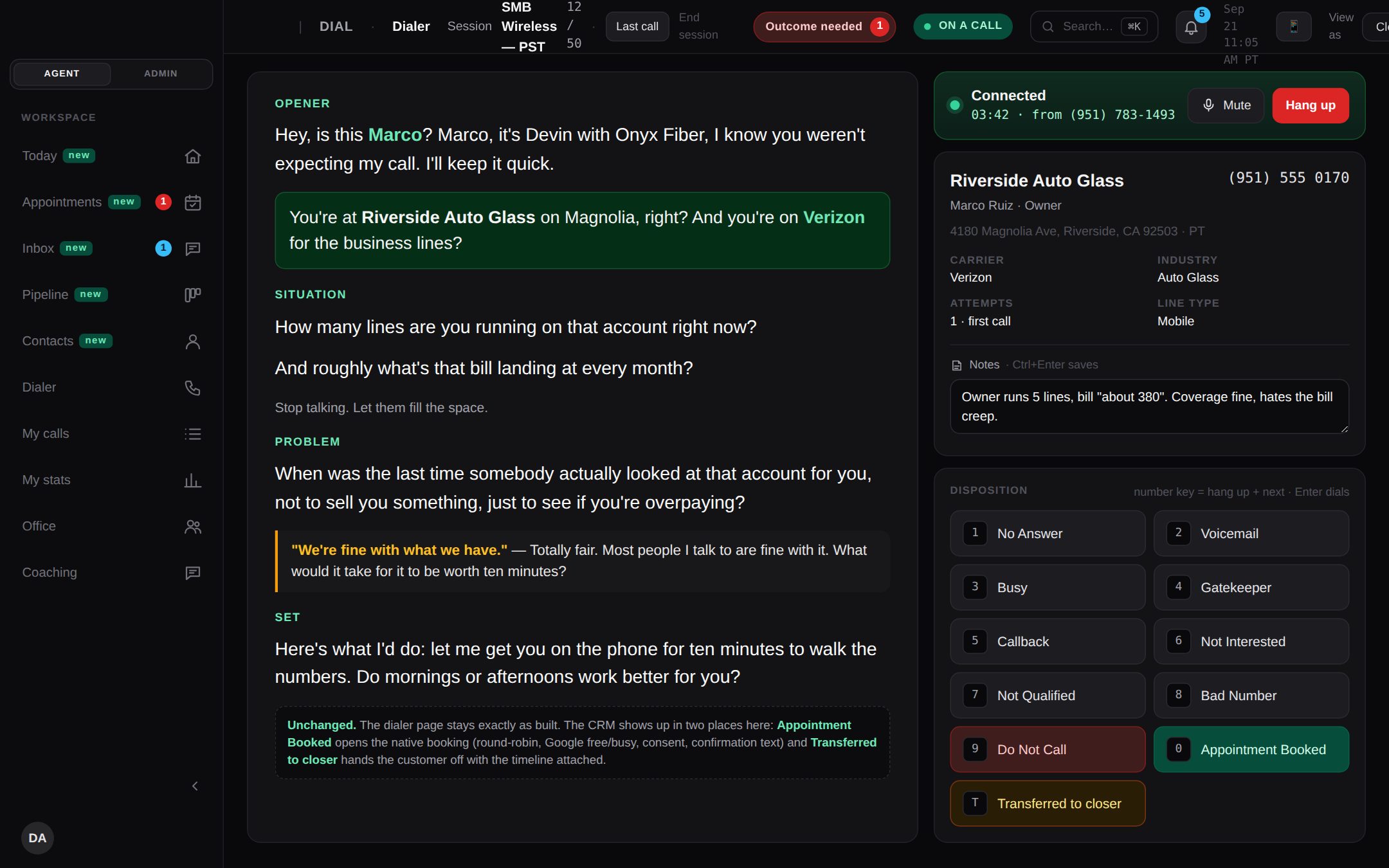
Owning isn't free of running costs or rules: you still pay a carrier for minutes, and numbers still need watching. The dialers we build do the watching themselves. A nightly check reads each number's spam label on every carrier. If a carrier labels a number as spam, the dialer stops calling that carrier from it, and a number flagged twice is retired and replaced, all inside the system your reps dial from.
How it's paid for: typically less than you spend today, paid monthly, and the build payments have an end date. There are no seat fees, and you get the code, the data and the IP. Here's how pricing works. For the bigger build-or-buy question, see custom CRM development.
The SaaS cost calculator adds up your stack in about two minutes. If it comes out at a few thousand a month, book a free audit and we'll show you what one system would replace.
Frequently asked questions
How much does Aircall cost?
Aircall lists $30 per license a month for Essentials and $50 for Professional, billed annually, with a 3-license minimum. Monthly billing costs more; Aircall says annual saves 25%. The Power Dialer is only on Professional. Enterprise is a custom quote for teams of 25 licenses or more.
How much does CloudTalk cost?
In US dollars, CloudTalk lists $25 a user a month for Starter, $29 for Essential and $49 for Expert on annual billing, or $34, $39 and $69 billed monthly. Expert has a 3-user minimum. The Power Dialer is included in Expert or $15 a user more on the other plans; the Parallel Dialer is $39 a user on any plan.
What is Aircall?
Aircall is a cloud phone system for sales and support teams. It handles inbound and outbound calls, texts and call recording, and syncs with CRMs like HubSpot and Salesforce. Its Power Dialer comes with the Professional plan.
What is CloudTalk?
CloudTalk is a cloud phone system built mostly around outbound sales calling. It syncs with CRMs like HubSpot, Salesforce and Zoho, and sells power and parallel dialing as add-ons or with its top plan.
Which has a parallel dialer, Aircall or CloudTalk?
CloudTalk. Its Parallel Dialer is a $39-a-user add-on on any plan and rings up to 5 numbers at once, or up to 10 on request for some accounts. Aircall's Power Dialer calls one number at a time.
Is CloudTalk legit?
Yes. CloudTalk is a real, widely reviewed cloud phone system: on Trustpilot it scores 4.2 out of 5 from 872 reviews (checked October 20, 2026). Its prices and terms are public on cloudtalk.io. Read the annual-contract terms before you sign: annual plans are paid upfront and not refundable.
Does CloudTalk have a free trial?
Yes. CloudTalk's pricing page offers a 14-day free trial, and you can start it without a credit card. Aircall also lets you test it before you commit.
Does CloudTalk integrate with GoHighLevel?
Not yet. CloudTalk's GoHighLevel page says the integration is in development and not yet available, with no launch date. Aircall lists a HighLevel integration built by its partner Airlinx, which may cost extra.