

Short answer
Copper CRM costs $23, $59 or $99 per seat a month billed annually for Basic, Professional and Business, or $29, $69 and $134 billed monthly. There's no free plan, only a 14-day trial. A 25-person team on Professional pays $1,475 a month on annual billing, before Google Workspace.
Copper is a CRM that lives inside Gmail and Google Calendar, sold to "relationship-focused service businesses" like agencies and consultancies. All Copper pricing here comes from Copper's pricing page, checked in a browser on October 27, 2026, in US dollars before tax.
| Plan | Billed annually | Billed monthly | Contacts | What it adds |
|---|---|---|---|---|
| Basic | $23 | $29 | 2,500 | Pipelines, tasks, projects |
| Professional | $59 | $69 | 15,000 | Deals, automation, reports, API |
| Business | $99 | $134 | Unlimited | Custom reports, SSO, email series |
| Cleanform, owned, no seat fees | $0 | $0 | Unlimited | Built around how you sell |
Cleanform is $0 a seat at any team size: you pay monthly for the build until it's paid off, then mostly hosting. How pricing works.
Copper CRM cost: what each plan includes and locks
Copper CRM sells three plans per seat: Basic at $23, Professional at $59 and Business at $99 a month billed annually. The price gap is about what you can track and automate. Basic has no sales opportunities, no workflow automation and no reports, so most sales teams start on Professional.
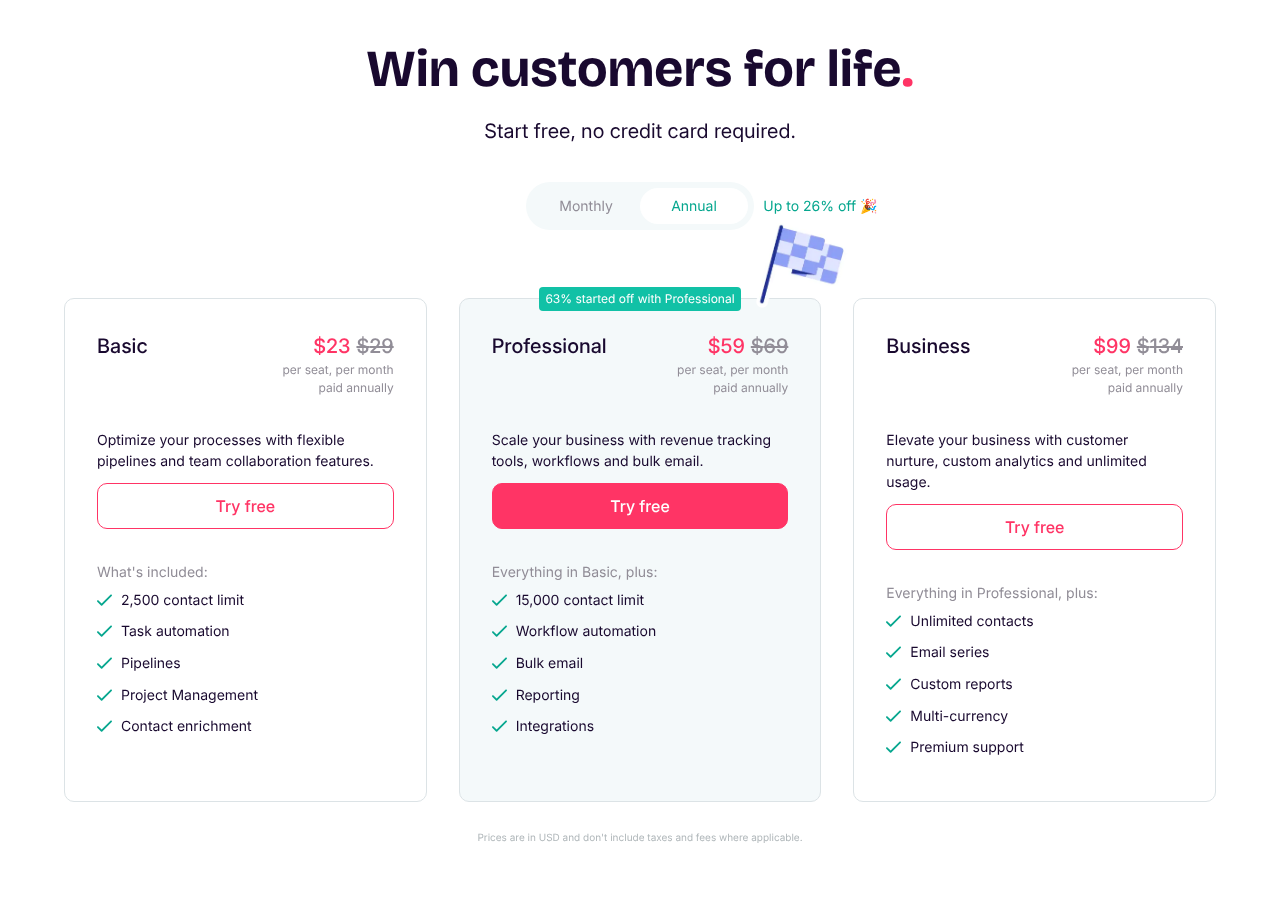
Source: Copper pricing page, annual billing, October 27, 2026.
The struck-through number on each card is the monthly-billing price. A badge on the page says "63% started off with Professional", and the feature grid under the cards shows why.
| Feature | Basic | Professional | Business |
|---|---|---|---|
| Contacts | 2,500 | 15,000 | Unlimited |
| Custom fields | 25 | 50 | Unlimited |
| Sales opportunities and leads | No | Yes | Yes |
| Workflow automation, bulk email | No | Yes | Yes |
| Activity and pipeline reports | No | Yes | Yes |
| Calling, Slack, QuickBooks, DocuSign apps | No | Yes | Yes |
| Custom reports, email series | No | No | Yes |
| Okta single sign-on, multi-currency | No | No | Yes |
Basic still gets task automation, project pipelines, contact enrichment, the mobile apps and the Gmail and Calendar sync. It works for a small team that tracks clients and projects. It doesn't work for a team that tracks deals, because the grid gives Basic no sales opportunities or leads.
Annual billing saves $72 a seat a year on Basic, $120 on Professional and $420 on Business. That's 21%, 14% and 26%, which is where Copper's "up to 26% off" comes from.
Copper CRM API
Copper CRM's API comes with Professional and Business, not Basic. The developer docs set the limit plainly: "All API calls are limited to 180 requests per minute" (Copper API rate limits). Go over and calls fail with an error until the minute rolls on. That's fine for syncing a form or a billing tool, and tight if you want to push a whole dialer's call log through it.
How much does Copper CRM cost at 10, 25 and 50 users?
Copper CRM costs a 10-user team $230 to $990 a month and a 50-user team $1,150 to $4,950 a month billed annually, depending on the plan. Copper publishes no seat minimum and no volume discount, so each figure below is seats multiplied by the list price.
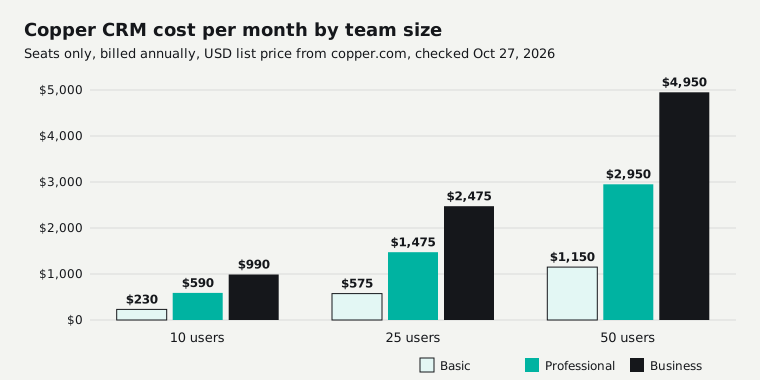
| Plan and billing | 10 users | 25 users | 50 users |
|---|---|---|---|
| Basic, annual ($23) | $230 | $575 | $1,150 |
| Basic, monthly ($29) | $290 | $725 | $1,450 |
| Professional, annual ($59) | $590 | $1,475 | $2,950 |
| Professional, monthly ($69) | $690 | $1,725 | $3,450 |
| Business, annual ($99) | $990 | $2,475 | $4,950 |
| Business, monthly ($134) | $1,340 | $3,350 | $6,700 |
| Cleanform, owned, no seat fees | $0 | $0 | $0 |
Over three years at a flat price, annual billing comes to:
| Users | Basic | Professional | Business |
|---|---|---|---|
| 10 | $8,280 | $21,240 | $35,640 |
| 25 | $20,700 | $53,100 | $89,100 |
| 50 | $41,400 | $106,200 | $178,200 |
Copper CRM cost per month: three real bills
A real Copper bill is the seat line plus Google Workspace, which Google bills on its own. These three use Workspace Business Standard at $14 a user a month on an annual plan (Google Workspace editions). They leave out a dialer, texting and tax.
| Team | Copper | Workspace | Per month | Per year |
|---|---|---|---|---|
| 10 reps, Professional | $590 | $140 | $730 | $8,760 |
| 25 reps, Professional | $1,475 | $350 | $1,825 | $21,900 |
| 50 reps, Business | $4,950 | $700 | $5,650 | $67,800 |
Most teams already pay for Workspace, so for them it's not a new cost. It still belongs in the total when you compare Copper with a CRM that runs on any email.
Is Copper CRM free? Free trial and what you pay for
Copper CRM is not free: there's no free plan, only a 14-day free trial with no credit card required (Copper sign-up). After the trial you pick Basic, Professional or Business. Some review sites still list a cheaper Starter plan with 1,000 contacts, but Copper's pricing page no longer shows it.
Copper keeps the price list short. The pricing page lists no add-ons, no seat minimum and no setup fee. Personal onboarding and a customer success manager are only for "eligible Business & Professional annual tier accounts", and Copper doesn't print a price for either.
Copper CRM free trial
Use the 14 days to test the thing most likely to push you up a plan. For a sales team that's deals and reports, which Basic doesn't have. Count your contacts too. A team with 3,000 contacts is already past Basic's 2,500 limit before the first call.
Copper CRM and Google Workspace: do you need both?
Copper CRM is built for Google Workspace, so it's a poor fit without it. You sign in with Google, and the Chrome extension, Gmail email sync and Google Calendar sync are the core of the product on every plan. The Google Sheets and Looker Studio connections start on Professional.
Copper's terms don't say you must have a Google account. But the reason to pay for Copper is that your reps never leave Gmail. If your team runs on Outlook, pick a CRM built for it.
Google Workspace costs $7, $14 or $22 a user a month on an annual plan for Business Starter, Standard and Plus, or $8.40, $16.80 and $26.40 on Google's flexible plan. A team moving to Google just for Copper adds that line to every seat.
Copper CRM reviews: contract, refunds and leaving
Copper CRM reviews praise how easy it is and how well it sits in Gmail, and complain about thin reporting, limited automation and a Basic plan that's too small for a sales team. The bigger catch is in the contract: Copper's terms lock you in for the full term and keep what you've paid.
The Copper terms of service (last modified July 1, 2025) set out how leaving works:
- No early exit. You can't end a subscription before the end of the term, except for cause.
- Auto-renewal. The subscription renews for a term the same length as the last one.
- Deadline. Cancel or change your plan before the last business day of the term, in Settings, then Billing.
- No refunds. The terms say "all fees paid are non-refundable", and Copper's cancellation article adds that it doesn't offer partial refunds. Only the Account Owner can cancel.
- Seats only go one way mid-term. Adding users is prorated right away. Cutting seats or dropping a plan waits for the next term.
- Price changes. Copper must give 60 days' notice before your term ends to change your price.
- After you leave. You get 30 days from termination to retrieve your data.
Data import and export are on every plan. List exports go to an Excel file and need a permission your admin turns on (Copper export help). Export before you cancel, not during the 30 days.
On a sales floor, the seat rule matters most. Reps come and go, and on an annual plan the seats you added in March stay on the bill until renewal. Bill annually only if your headcount is steady. More on what each vendor lets you take with you is in CRM data ownership and export.
Copper CRM vs HubSpot and other CRMs on price
Copper CRM is cheaper per seat than HubSpot for a sales team: Copper Professional is $59 a seat a month billed annually, while HubSpot Sales Hub Professional is $90 plus a one-time $1,500 onboarding fee. HubSpot's free CRM covers up to 2 users. Streak, the other Gmail-native CRM, starts its paid plans lower, at $49.
| CRM plan (billed annually) | Per seat | 10 users | 25 users | 50 users |
|---|---|---|---|---|
| monday CRM Pro | $28 | $280 | $700 | Quote only |
| Streak Pro | $49 | $490 | $1,225 | $2,450 |
| Copper Professional | $59 | $590 | $1,475 | $2,950 |
| Streak Pro+ | $69 | $690 | $1,725 | $3,450 |
| HubSpot Sales Hub Pro | $90 | $900 | $2,250 | $4,500 |
| Copper Business | $99 | $990 | $2,475 | $4,950 |
| Cleanform, owned, no seat fees | $0 | $0 | $0 | $0 |
Competitor prices were checked October 26, 2026. HubSpot's onboarding fee comes on top in year one. How HubSpot compares with an all-in-one tool is in GoHighLevel vs HubSpot.
Pipedrive's plans, and 16 other vendors, are in our sales software pricing index. Zoho is cheaper again, with a free edition for 3 users (Zoho CRM pricing), and monday's seat buckets are explained in monday CRM pricing.
Copper is fairly priced for a small, relationship-led team that lives in Gmail and stays on Professional. It stops looking cheap at 25 or more seats on Business, where it costs more than HubSpot Pro per seat, and its pricing page lists no dialer. Calling runs through the JustCall or RingCentral integrations, on their own bills.
Copper CRM alternatives: keep renting or own it
Keep Copper CRM if it and the tools around it cost under $1,000 a month and fit how you sell. Ten users on Professional is $590 a month, well inside that line. The alternative worth pricing is owning one system, and it starts to pay once the stack passes about $2,000 a month.
The stack is usually the bill. A 25-person team on Professional pays $1,825 a month with Workspace. Add a per-seat dialer and a texting tool and it passes $2,000 a month, growing with every hire. Business at 50 seats is $4,950 a month for the CRM alone.
One client's sales floor ran a per-seat dialer, a per-seat CRM, a scheduling tool and a Zap: about $4,500 a month for eight closers, and every new rep was a $560-a-month decision. We replaced all four with one system the business owns, with the dialer, script and pipeline on one screen. Hosting runs about $300 a month, and an added seat costs $0 (the dialer and CRM case study).
With Cleanform you keep the code, the data and the IP. It's typically less than you spend today, paid monthly, and the build payments have an end date (how pricing works). The build-or-buy call is in custom CRM development, and the wider field is in our CRM software guide.
Sources
Copper pages checked in a browser October 27, 2026. Competitor prices checked October 26, 2026. Prices change, so check the vendor's page before you buy.
- Copper pricing page (annual and monthly toggle, feature grid) and Copper sign-up
- Copper terms of service, cancel subscription, export help (October 26) and API rate limits
- Google Workspace editions and prices
- Streak pricing, HubSpot Sales Hub pricing and monday CRM pricing
The SaaS cost calculator adds up your whole stack in about two minutes. If it comes out at a few thousand a month, book a free audit and we'll show you what one owned system would replace.
Frequently asked questions
How much does Copper CRM cost per month?
Copper CRM costs $23, $59 or $99 per seat a month billed annually for Basic, Professional and Business, or $29, $69 and $134 billed monthly. Prices are in US dollars before tax. A 10-person team on Professional pays $590 a month billed annually.
Is Copper CRM free?
No. Copper CRM has no free plan. You get a 14-day free trial with no credit card, then you pick Basic, Professional or Business. Some review sites still list a cheaper Starter plan, but it isn't on Copper's pricing page anymore.
Is Copper a CRM system?
Yes. Copper is a CRM built to run inside Google Workspace. It tracks contacts, companies, deals and projects from Gmail and Google Calendar, and Copper aims it at relationship-focused service businesses such as agencies, consultants and financial services firms.
Does Copper CRM need Google Workspace?
In practice, yes. You sign in with Google, and Copper's email sync, calendar sync and Chrome extension all work with Gmail and Google Calendar. Google Workspace is a separate bill from Google, $7 to $22 a user a month on an annual plan.
Can I cancel Copper CRM any time?
You can request cancellation any time, but it takes effect at the end of your term. Copper's terms say you can't end a subscription early, it auto-renews for the same length, and fees are non-refundable. Cancel before the last business day of the term.
What is the most cost-effective CRM?
The most cost-effective CRM is the cheapest one that covers your must-have features without an upgrade. For a Gmail team that needs automation and reports, Copper Professional at $59 a seat is the realistic floor. Our sales software pricing index compares every plan from 17 vendors.