

Short answer
A working GoHighLevel setup for a sales team is a build, not an install. You set up the pipeline, fields, workflows, calendars, phone and email yourself, or load most of it from a snapshot, then clear text and email registration before you can send at scale.
HighLevel publishes no setup time. Providers who build accounts quote from 3 to 5 business days up to 3 to 4 weeks, and the waits you can't control (A2P review, DNS and email warm-up) are what stretch it. HighLevel's own setup help costs $1,000; outside builders charge from $100 to about $5,000. None of the setup is yours to keep: cancel, and the workflows stop.
We ran sales teams on GoHighLevel for five or six years, with hundreds of reps through it. Facts below come from gohighlevel.com and HighLevel's help center, checked October 21, 2026.
| GoHighLevel setup at a glance | What HighLevel publishes |
|---|---|
| Free trial | 14 days, card required |
| Setup fee | None on the pricing page |
| HighLevel's setup help | Advanced Account Setup, $1,000 |
| Setup time | Not published |
| Texting registration (US) | $22.50 or $64.00 once, $1.50 to $10 a month per campaign |
| Email warm-up | Up to 4 weeks |
| If you cancel | Data kept 90 days; numbers and A2P gone after 14 |
Plan prices and the usage you pay on top are in our GoHighLevel pricing breakdown.
How to set up GoHighLevel: the steps in order
To set up GoHighLevel for a sales team, start the trial, create a sub-account for your business, build or import the sales setup, connect phone and email, register for texting, then test everything before you load reps. The 14-day free trial needs a card, billing starts when it ends, and usage fees for calls and texts can apply during the trial.
- Start the trial and create a sub-account. A business running its own team picks "This is my own account". HighLevel calls that an Agency Sub-Account, and it can't be transferred to another agency.
- Build the pipeline. Opportunities, then Pipelines, then "Create new pipeline", and add a stage for each step of your sale. Won and Lost stages are created for you.
- Add custom fields and tags. Pick the object first (contact, opportunity, company). A custom field can't be moved between objects later, only recreated.
- Set up calendars. A round-robin calendar shares bookings across reps by availability or equally. It can't send certain leads to certain reps.
- Build the workflows that text, email, assign and move deals (more below).
- Buy numbers and set up calling. Local numbers are $1.15 a month; calls and texts are billed per minute and per segment.
- Connect a sending domain for email and a domain for your pages.
- Register for A2P texting and wait for approval.
- Add users and permissions. Each sub-account user is an Admin or a User with permissions per module, and you can limit reps to their own contacts and deals.
- Test, then go live. Run a fake lead through every step before a rep touches a real one.
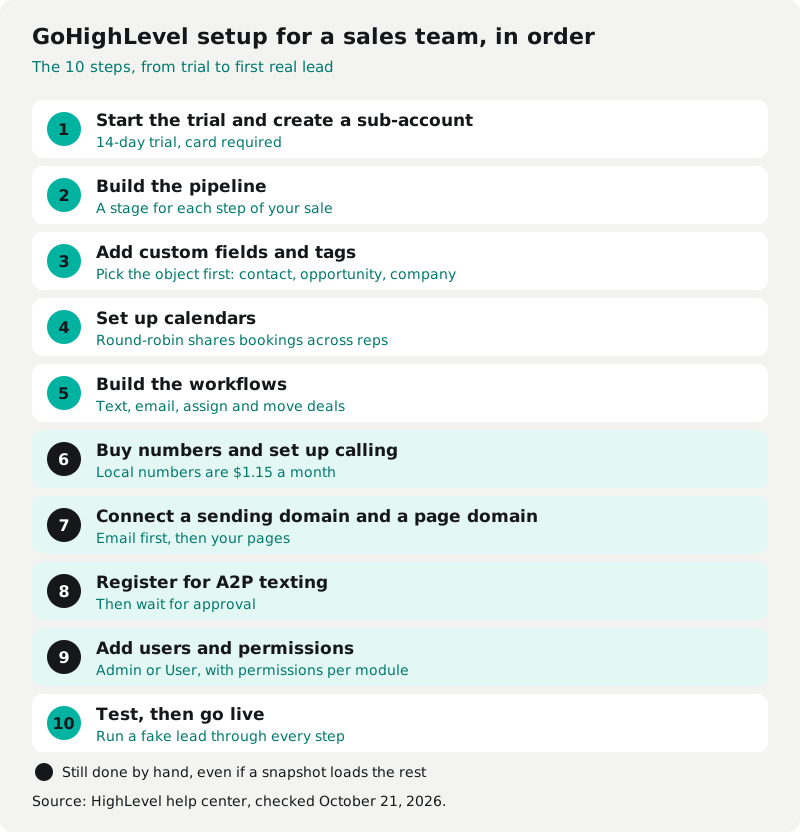
You don't have to build every piece in a blank account. A snapshot copies another sub-account's workflows, funnels, pipelines, calendars and fields into yours, but not its contacts, phone numbers, A2P registration, email DNS or connected accounts, so steps 6 to 9 still happen by hand. Free and paid snapshots, how to import one and who owns it are in our guide to GoHighLevel snapshots.
GoHighLevel CRM setup for a sales team
The GoHighLevel CRM setup a sales team needs comes down to three parts: one pipeline that matches how you sell, the fields reps fill in on every call, and workflows that move deals without anyone remembering to. Everything else (funnels, reviews, memberships) can wait.
Two things catch sales teams. The dialer is a task queue: HighLevel's Manual Call action adds contacts to a list in Conversations that reps work one call at a time, and HighLevel's pages don't describe parallel or automatic dialing. And rep-by-rep reporting is listed only on the $497 Agency Pro plan.
Many teams add a dialer on top. We ran Wavv inside GoHighLevel for about a year, at about $100 to $150 a seat. It connected straight in, but it was slow and laggy.
GoHighLevel onboarding: what HighLevel gives you
GoHighLevel onboarding is free guidance for the first 90 days, then paid. During the trial you get a kickoff call and a Trial Experience Team; for the first 90 days as a paying customer, a Success Team gives onboarding guidance. Support runs 24/7 by chat and Zoom.
The live help is a queue. HighLevel's onboarding page books you into an on-demand Zoom room where people are helped in the order they arrive, and it warns that waits apply. HighLevel doesn't publish how long the onboarding call lasts.
After 90 days, faster help costs extra. Premium Support is $500 a month or $5,000 a year and cuts the chat and Zoom wait from about 6 minutes to 1, and the first ticket reply from about 10 hours to 3.
Some accounts also get LaunchPad, an in-app setup checklist with videos for business details, contacts and calendars. Not everyone sees it: existing agencies don't get the new version, and HighLevel is testing it with half of eligible customers.
GoHighLevel automation: what you build yourself
GoHighLevel automation runs on workflows, and workflows are where most of the setup hours go. A workflow is a trigger (a form filled in, a tag added, a deal moved) followed by actions: send a text, assign a rep, create a task, wait, move the deal. HighLevel publishes no limit on how many you build.
For a sales team, the first workflows are usually speed to lead, missed-call text back, appointment reminders, no-show follow-up and deal-stage tasks. Each one needs its fields, tags and templates in place first. That's why we call GoHighLevel build-it-yourself: unless you spend many hours building it right, it isn't going to go well.
GoHighLevel workflows: what they cost to run
GoHighLevel workflows are free to run on standard steps, and premium steps cost $0.01 each. HighLevel names inbound and custom webhooks, Google Sheets, Slack and marketplace apps as premium, and gives each sub-account 100 free premium runs for life, not per month.
| Workflow Pro tier | Monthly price | Premium runs included | After that |
|---|---|---|---|
| Free | $0 | 100 (lifetime) | $0.01 each |
| Starter | $10 | 10,000 | $0.008 each |
| Growth | $25 | 30,000 | $0.006 each |
| Scale | $50 | 65,000 | $0.004 each |
Source: HighLevel pricing guide, modified August 22, 2026. AI steps are billed separately.
GoHighLevel A2P registration: the step that delays texting
GoHighLevel A2P registration is required before a US business can text customers from a 10-digit local number, and it's the step most likely to hold up launch. You register a brand, then a campaign; brand approval alone doesn't let you text, and numbers not linked to an approved campaign fail with error 30034.
What you need ready:
- Your EIN exactly as it reads on the IRS CP-575 or 147C letter. DUNS numbers aren't accepted, and EINs under 15 days old may be rejected. Without an EIN you can only register as a sole proprietor: one number, 3,000 message segments a day.
- A public website with your business name and contact details, matching the brand.
- A privacy policy, terms and an opt-in form with a separate, unticked texting checkbox.
| A2P fee (HighLevel, US) | Amount |
|---|---|
| One-time, sole proprietor or low-volume standard | $22.50 |
| One-time, high-volume standard | $64.00 |
| Each extra campaign | $15.00 |
| Monthly, standard campaign | $10.00 |
| Monthly, low-volume mixed | $1.50 |
| Monthly, sole proprietor | $2.00 |
Source: HighLevel A2P fees article, modified September 24, 2026.
HighLevel gives no firm approval time. The one-time fee includes a $3 Fast Track charge meant to speed approval to within 3 business days, standard brands can take several business days, and when a trust score can't be pulled, review can take up to 7 business days. Campaigns sit in Pending until carriers finish.
Rejections are mostly fixable: consent wording, a missing privacy policy, a name that doesn't match the EIN, URL shorteners. Some aren't. HighLevel's rejection guide lists third-party lead generation, loan marketing, debt relief and credit repair as disallowed content and says not to resubmit. Teams in those lines should know before they build around texting.
Registration is a carrier rule, not consent. Marketing calls and texts made with an autodialer still need the prior express written consent of the person you contact; our TCPA guide for sales calls explains the rules. This isn't legal advice.
GoHighLevel email setup
GoHighLevel email setup means sending from your own subdomain, adding the DNS records HighLevel gives you, then warming the domain up for as long as 4 weeks. Under Settings, Email Services, the Dedicated Domain and IP tab takes a sending subdomain such as mg.yourbrand.com and shows the records to add.
- Records: SPF, DKIM, two MX and a CNAME, plus a DMARC record. Keep one SPF record per domain, and start DMARC at p=none and watch it before you tighten it. The sending runs on Mailgun behind the scenes.
- Warm-up: HighLevel's sending guide starts a new domain at 1,000 emails a day, then 2,500, and says warm-up can take up to 4 weeks.
- Gmail's rules: senders of more than 5,000 a day to Gmail need SPF, DKIM, DMARC, one-click unsubscribe and a spam rate under 0.30%.
Email costs $0.675 per 1,000 sends. A dedicated IP is $59 a month on the $297 and $497 plans, and HighLevel says it matters most above 200,000 emails a week.
GoHighLevel domain setup
GoHighLevel domain setup for your pages is separate from email. Under Settings, Domains, Connect a Domain, you add an A record for a root domain or a CNAME for a subdomain, using the values HighLevel shows you. Propagation takes a few minutes up to 24 hours. On Cloudflare, set those records to DNS only.
GoHighLevel setup service: what it costs and how long it takes
A GoHighLevel setup service costs $1,000 from HighLevel itself, and outside builders publish one-time prices from $100 to about $5,000. HighLevel's Advanced Account Setup is "a done-with-you setup service" with guided setup, consulting and implementation support. It doesn't publish a timeline; outside builders quote from 3 to 5 business days to 3 to 4 weeks.
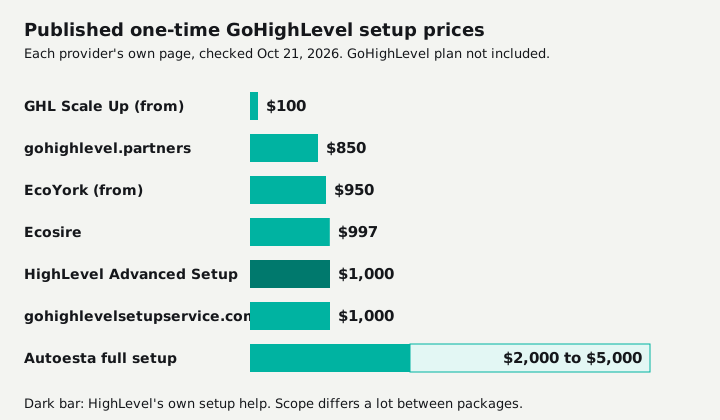
| Provider | Published price | Stated time |
|---|---|---|
| HighLevel Advanced Account Setup | $1,000 | Not published |
| GHL Scale Up | From $100, one-time | 2 to 3 weeks |
| gohighlevel.partners | $850 plus $38.80 a month | Depends on scope |
| EcoYork | From $950 | Not published |
| Ecosire | $997, up to 3 pipelines and 5 workflows | 5 to 7 business days |
| gohighlevelsetupservice.com | Full build from $1,000 | 3 to 5 business days for most packages |
| Autoesta | Full setup about $2,000 to $5,000 | Small 5 to 7 business days, large 3 to 4 weeks |
Prices and times are each provider's own, checked October 21, 2026. None of them include the GoHighLevel plan.
Read the scope before the price. A $997 package with five workflows and a $5,000 build are different jobs, and A2P approval can add days that are out of any builder's hands. Whoever builds it, the build lives in your HighLevel account, so it stops with the subscription.
What do you keep if you cancel GoHighLevel?
If you cancel GoHighLevel, you keep a contacts CSV, not the setup. Your sub-accounts lose access, workflows and automations stop, and HighLevel keeps the data for 90 days, then can't restore it. Phone numbers and A2P registrations are deleted after 14 days, and you're charged for them until then.
| What you set up | Can you take it with you? |
|---|---|
| Contacts | Yes, a CSV per sub-account, admins only, no message history |
| Deals | Yes, an opportunities export exists |
| Workflows, funnels, calendars | Only as a snapshot, into another HighLevel account |
| Snapshots you bought | No, they're licensed inside HighLevel |
| Phone numbers and A2P | Deleted after 14 days |
A Pause plan at $27 a month keeps the data and snapshots, but you're still paying to keep something you can't use anywhere else. The terms do say you own the content you provide to HighLevel. The working system built from it doesn't leave. More on what any CRM lets you take out in CRM data ownership and export.
However much you pay GoHighLevel, or a builder to set it up, the system never becomes yours. Stop paying and the account, the workflows and the setup stop with it. At the about $1,000 a month we paid all-in on the agency plan, three years is $36,000 of rent (our arithmetic), and nothing the business owns at the end.
There's a third option. Cleanform builds one system around how your team sells and hands over the code, the data and the IP. One client's floor paid about $4,500 a month for eight closers across a per-seat dialer, a per-seat CRM, a scheduling tool and a Zap. Now it's one system they own, hosting runs about $300 a month, and an added seat costs $0 (case study).
It's typically less than you spend today, paid monthly, and the build payments have an end date. Here's how pricing works, and custom CRM development covers when building beats renting. If GoHighLevel and everything around it costs under $1,000 a month and fits how you sell, keep it and set it up well. Our GoHighLevel review has the pros and cons, GoHighLevel alternatives compares the per-seat options, and the wider field is in our CRM software guide.
Sources
Checked October 21, 2026, unless noted.
- GoHighLevel pricing page
- HighLevel pricing guide (modified August 22, 2026)
- 24/7 support options (modified August 3, 2026) and Premium Support (modified August 12, 2026)
- Sub-Account LaunchPad (modified September 11, 2026)
- Snapshots overview (modified October 9, 2026)
- Premium workflow actions (modified September 28, 2026)
- A2P brand registration (modified September 29, 2026), A2P fees (modified September 24, 2026), brand approval and campaign rejections (modified October 16, 2026)
- Email authentication, email warm-up and connecting a domain
- What happens when you cancel (modified August 18, 2026), contacts export and the Pause plan
- HighLevel terms of service (updated June 2026)
- 47 CFR 64.1200 and Google's email sender guidelines
- Setup providers' own pricing pages, linked in the table above
The SaaS cost calculator adds up your stack in about two minutes. If it comes out at a few thousand a month, book a free audit and we'll show you what one system would replace.
Frequently asked questions
What is the GoHighLevel app?
GoHighLevel (HighLevel) is a CRM with texting, email, calling, calendars, funnels and workflows in one account, sold mainly to marketing agencies. There's also a HighLevel mobile app for reps to work leads, messages and appointments from a phone.
How do I connect a domain in GoHighLevel?
Go to Settings, then Domains, then Connect a Domain, and add the DNS records HighLevel shows you at your registrar: an A record for a root domain or a CNAME for a subdomain. HighLevel says the change can take from a few minutes up to 24 hours.
Is GoHighLevel worth it?
For a sales team with someone to build and maintain it, yes: every plan has unlimited users at a flat price. For a team that wants to log in and sell on day one, no. Our full GoHighLevel review covers the pros and cons.
Do I need A2P registration for GoHighLevel?
Yes, if you text US customers from a 10-digit local number. You register a brand and then a campaign. HighLevel's one-time fee is $22.50 or $64.00, plus $1.50 to $10 a month per campaign, and texts from unregistered numbers fail.