

Short answer
The GoHighLevel API is HighLevel's REST API for reading and writing contacts, opportunities, conversations, calendars, payments and more from your own software. It comes with the paid plans, the old v1 API keys are end of life, and new work uses a Private Integration token or OAuth 2.0 under a limit of 100 requests per 10 seconds.
Guides that tell you to copy a key from Settings are out of date. Everything below comes from HighLevel's own docs, help center and pricing page, checked October 23, 2026. I ran sales teams on GoHighLevel for five or six years and paid for the agency plan for its API access, so I'll also say where the API runs out.
| GoHighLevel API at a glance | |
|---|---|
| Versions | v3 (latest), plus dated versions back to 2021; v1 keys ended support December 31, 2025 |
| How you sign in | Private Integration token (your own account) or OAuth 2.0 (Marketplace apps) |
| Plans | Basic API on Unlimited ($297), Advanced on Agency Pro ($497); Starter per the help center only |
| Rate limit | 100 requests per 10 seconds, 200,000 per day, per app per sub-account |
| Webhooks | More than 70 events, retried up to 12 times |
| API fee | None published; usage and premium workflow steps are billed |
HighLevel API: what it is
The HighLevel API is a set of REST endpoints at services.leadconnectorhq.com that let another system read and change data in a HighLevel account. HighLevel gives you two ways in: a Private Integration token for internal tools on your own account, and OAuth 2.0 for apps installed on many accounts through its Marketplace (HighLevel API documentation).
It's a big surface: HighLevel's own index lists 794 endpoints in 46 services for v3.
GoHighLevel API documentation
The GoHighLevel API documentation lives at marketplace.gohighlevel.com/docs, with a version picker for v3, 2023-02-21, 2021-07-28 and 2021-04-15. You pick the version on each request with a Version header (versioning). v3 came out June 11, 2026. The docs never say "v1" or "v2". Those labels come from HighLevel's blog and help center, where v1 means the old API keys and v2 means the current token and OAuth system.
GoHighLevel API v2: what happened to v1
GoHighLevel API v1 reached end of support on December 31, 2025, and HighLevel has disabled new v1 keys. Existing v1 connections still run, but HighLevel gives them no fixes, no security patches and no support, so anything built on an old key should move to v2 now.
HighLevel's deprecation post (June 26, 2026) gives the reason: v1 keys opened the whole account, and v2 gives each integration only the scopes it needs. There's no published date when v1 stops working, so don't wait for one. The migration guide warns that requests and responses can differ, so plan a rebuild, not a key swap, and delete the old key last.
GoHighLevel API key: how to get a token now
You can't create a GoHighLevel API key anymore. The replacement is a Private Integration token. It works like a key: you make it in your account settings, choose what it can touch, and send it with every request (Private Integrations).
- Open Settings and find Private Integrations. If it isn't there, turn it on in Labs.
- Click Create new Integration and give it a name your team will recognize.
- Pick only the scopes the tool needs, such as reading contacts or writing opportunities.
- Copy the token straight away. HighLevel won't show it again.
Send it as Authorization: Bearer <token> with the Version header. The token doesn't expire on its own. Rotate it every 90 days, as HighLevel suggests, and the old one keeps working for 7 days while you switch.
GoHighLevel API token: Private Integration or OAuth
Use a Private Integration token for anything that runs on your own account, like a script, a Zapier or n8n flow, or an internal tool. Use OAuth 2.0 only if you're building an app other HighLevel accounts will install.
OAuth means registering a Marketplace app. Its access tokens last about 24 hours, and each refresh token works once, so your code stores the new one every time. The help center puts OAuth under Advanced access, which is Agency Pro.
GoHighLevel API access: which plan includes it
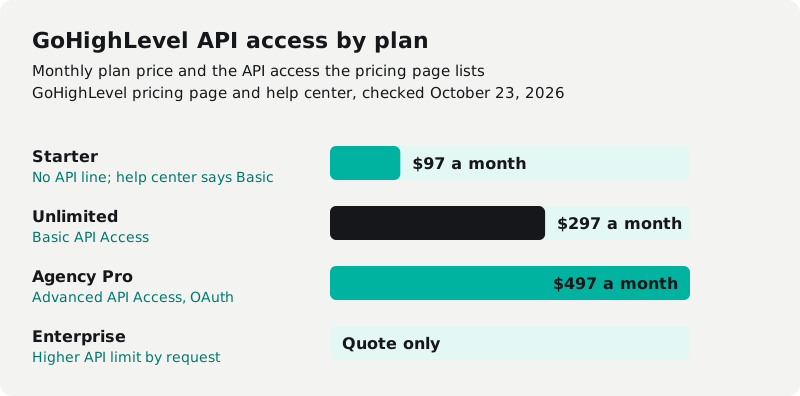
GoHighLevel's pricing page lists Basic API Access on Unlimited ($297 a month) and Advanced API Access on Agency Pro ($497). Starter ($97) has no API line on the pricing page, but HighLevel's help center says Basic access is included with Starter too.
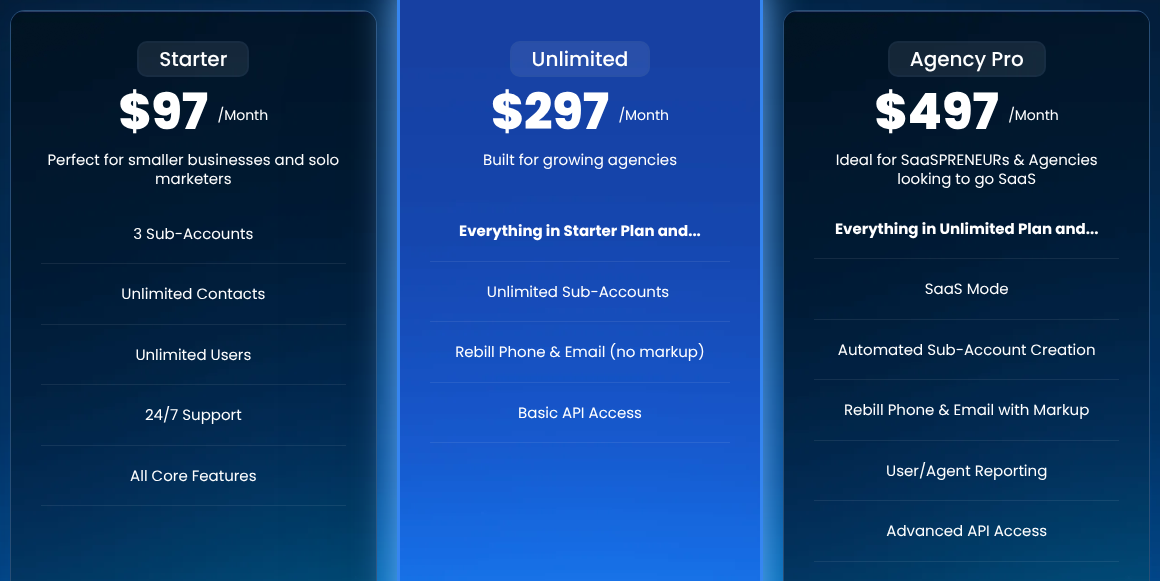
Source: GoHighLevel pricing page, October 23, 2026.
| Plan | Price a month | Pricing page | Help center |
|---|---|---|---|
| Starter | $97 | No API line | Basic API access |
| Unlimited | $297 | Basic API Access | Basic API access |
| Agency Pro | $497 | Advanced API Access | Advanced, with OAuth and agency-level tokens |
| Enterprise | Quote only | "Increase API Limit by request" | Not listed |
My call: if an integration matters to the business, budget for Unlimited and treat Starter's access as a bonus. HighLevel says some endpoints are only on higher plans without listing which, so test yours during the trial. Agency-level access is the reason to buy Agency Pro. I was on the agency plan, about $500 a month, for years for exactly that, and with usage it came to about $1,000 a month all-in back then.
Is the GoHighLevel API free?
HighLevel publishes no separate fee for the GoHighLevel API. You pay for the plan. What adds up is the usage around it. Calls, texts, email and AI are billed by use, and the workflow steps that send or catch webhooks are premium: $0.01 a run after 100 free, or a Workflow Pro add-on at $10, $25 or $50 a month per sub-account (HighLevel pricing guide). What a full bill looks like for a sales team is in our GoHighLevel pricing breakdown.
GoHighLevel API rate limit: 100 requests per 10 seconds
The GoHighLevel API rate limit is 100 requests per 10 seconds and 200,000 requests per day. The limit is counted per Marketplace app for each sub-account or agency it's installed on, so adding a second sub-account gives that app a second, separate allowance (rate limits).
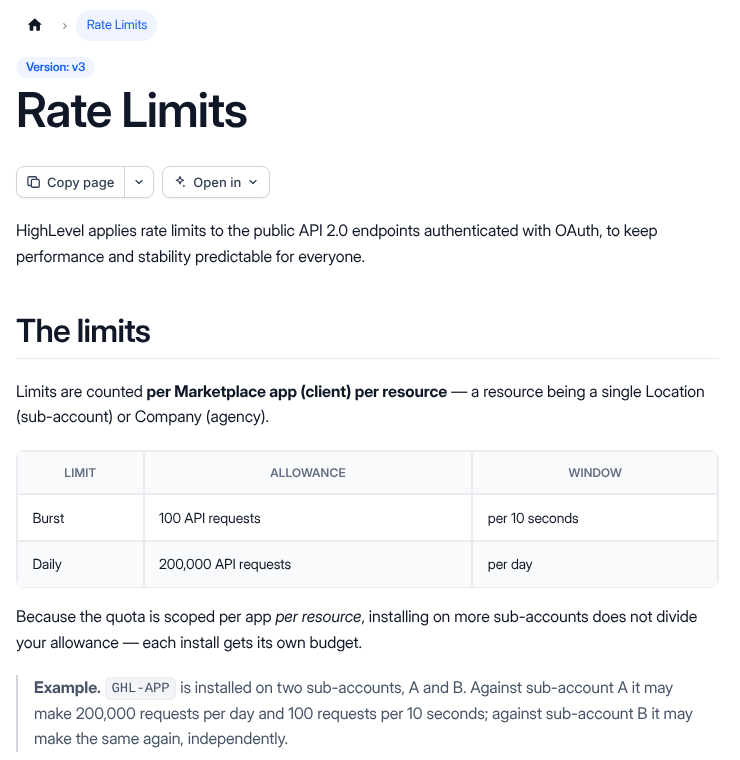
Source: HighLevel developer docs, rate limits page, October 23, 2026.
Every response carries headers such as X-RateLimit-Remaining, so your code can slow down before it hits the wall. Some guides quote 500 requests per 10 seconds. HighLevel's page says 100.
GoHighLevel API limits vs HubSpot and Pipedrive
GoHighLevel's API limits sit in the same range as HubSpot's lower tiers. HighLevel publishes one limit for every plan, and only Enterprise lists a higher limit, by request.
| CRM | Burst limit | Daily limit |
|---|---|---|
| GoHighLevel | 100 per 10 seconds, per app per sub-account | 200,000 |
| HubSpot (usage limits) | 100 to 190 per 10 seconds, per app | 250,000 to 1,000,000 per account, by tier |
| Pipedrive (rate limiting) | 20 to 120 per 2 seconds, per user token, by plan | 30,000 tokens × plan multiplier × seats |
What the HighLevel API can and can't do
The HighLevel API covers the core CRM well and has real gaps around calling, automation and account templates. The gaps below are endpoints missing from HighLevel's own index, so those jobs stay manual in the app.
| It can | It can't, or only partly |
|---|---|
| Create, update, search and tag contacts (32 endpoints) | Place or control calls: phone endpoints only list and buy numbers |
| Manage opportunities and pipelines (16) | List all calls: only Voice AI calls have a call log |
| Send messages and log a call made elsewhere | Create or edit workflows: limited to selected sub-accounts |
| Fetch a call's recording and transcript, one message at a time | Build forms or surveys: read-only |
| Book and move appointments (59 calendar endpoints) | Create or push snapshots: list and share only |
| Add a contact to an existing workflow |
GoHighLevel webhooks
GoHighLevel webhooks push events to your server so you don't have to keep asking the API what changed. There are three kinds: Marketplace app webhooks, a workflow Webhook action that sends data out, and an Inbound Webhook trigger that starts a workflow when data comes in.
App webhooks cover more than 70 events, from a new contact to a paid invoice. A failed delivery is retried up to 12 times, and each is signed with an X-GHL-Signature header you can verify (webhook guide). The workflow versions need no app, but both are premium steps billed per run.
GoHighLevel API integration: Zapier, Make and n8n
Most GoHighLevel API integrations don't need custom code: Zapier, Make and n8n all connect to HighLevel, on the same API and limits.
- Zapier: the LeadConnector app has one trigger (pipeline stage changed) and five actions. For anything else, send a workflow Webhook to Zapier's Catch Hook, which needs a paid Zapier plan.
- Make: its HighLevel app has triggers that watch for events and actions such as creating a contact, adding a note or creating a task.
- n8n: its HighLevel node covers contacts, opportunities, tasks and calendar booking.
The rule I'd use: workflows for anything that stays inside HighLevel, webhooks to push events out, and the API when another system has to read or write on its own schedule.
What goes wrong with the HighLevel API
The complaints agencies and developers report most about the HighLevel API are the forced v1 move, access gated by plan, and no agency-wide token. HighLevel Support doesn't give hands-on API coding or debugging help, so when something breaks you pay a developer.
An "Agency Level API" request on HighLevel's ideas board got 316 votes and was closed in September 2026. HighLevel's reply: "It is not a secure way to handle automations or changes to sub-accounts." A tool that touches every sub-account needs a token per sub-account or an OAuth app.
When to stop building on the HighLevel API
Stop building on the HighLevel API when you're paying for Agency Pro and premium steps just to work around limits you didn't set. At that point the problem isn't the API. You're renting the system, so the vendor decides the limits, the plan gates and what you can take with you.
The edges are in HighLevel's own docs. A contact export is admin-only, holds only the columns on screen, leaves out past emails and texts, and the file disappears after 30 days. Snapshots carry workflows but not contacts or conversations, and only load into another HighLevel account. HighLevel's terms keep your data 90 days after you cancel, then it can be deleted. More on what any CRM lets you take out in CRM data ownership and export.
On a system you own there's no vendor request limit and no export gap. The database is yours, and the only limit is the server you pay for. One client's sales floor paid about $4,500 a month for eight closers across a per-seat dialer, a per-seat CRM, a scheduling tool and a Zap that broke whenever a vendor shipped an update. Now it's one system in a cloud account the business owns, hosting runs about $300 a month, and an added seat costs $0 (case study).
It's typically less than you spend today, paid monthly, and the build payments have an end date. Here's how pricing works. If GoHighLevel and its add-ons cost under $1,000 a month and the API does what you need, keep it. For the build-or-buy call, see custom CRM development. Other platforms are in GoHighLevel alternatives, the pros and cons in our GoHighLevel review, and the wider field in our CRM software guide.
Sources
Checked October 23, 2026.
- HighLevel API documentation (help center, modified October 14, 2026)
- GoHighLevel pricing page and HighLevel pricing guide
- HighLevel developer docs: Private Integrations, OAuth 2.0, rate limits, versioning, webhook guide and the v3 endpoint index
- Deprecating API v1 (June 26, 2026) and the migration guide
- Contacts export, snapshots overview and terms of service
- HubSpot API usage limits and Pipedrive rate limiting
- Zapier LeadConnector app, Make HighLevel app and n8n HighLevel node
- HighLevel ideas board: Agency Level API (user request)
The SaaS cost calculator adds up your stack in about two minutes. If it comes out at a few thousand a month, book a free audit and we'll show you what one system would replace.
Frequently asked questions
Is the GoHighLevel API free?
HighLevel publishes no separate API fee. The API comes with the plan, and the pricing page lists Basic API Access on Unlimited ($297 a month) and Advanced API Access on Agency Pro ($497). Calls, texts, email and AI are billed as usage, and premium workflow steps like webhooks cost $0.01 a run after 100 free.
What are the GoHighLevel API rate limits?
100 requests per 10 seconds and 200,000 requests per day, counted per Marketplace app for each sub-account or agency it's installed on. Every response carries X-RateLimit headers showing what's left. Enterprise accounts can ask for a higher limit.
Where do I find my GoHighLevel API key?
You don't, anymore. HighLevel disabled new v1 API keys. Create a Private Integration in your account settings instead (turn it on in Labs if you can't see it), pick the scopes, and copy the token. It's shown once.
Can I still use my old GoHighLevel API key?
For now, yes. HighLevel says existing v1 connections keep running, but v1 reached end of support on December 31, 2025, so it gets no fixes or help. HighLevel hasn't published a shutdown date. Move to a Private Integration token before it breaks.
Does GoHighLevel Starter have API access?
HighLevel's help center says Basic API access is included with Starter and Unlimited. The pricing page lists Basic API Access only under Unlimited and shows no API line on Starter. If an integration matters to the business, buy Unlimited or get Starter's access confirmed by support in writing.
Do I need a developer to use the GoHighLevel API?
Creating a token takes no code. Anything past Zapier, Make or n8n does, and HighLevel's support won't help write or debug API code. Budget for a developer if you're building more than a simple sync.